Technical Drawing Tutorial
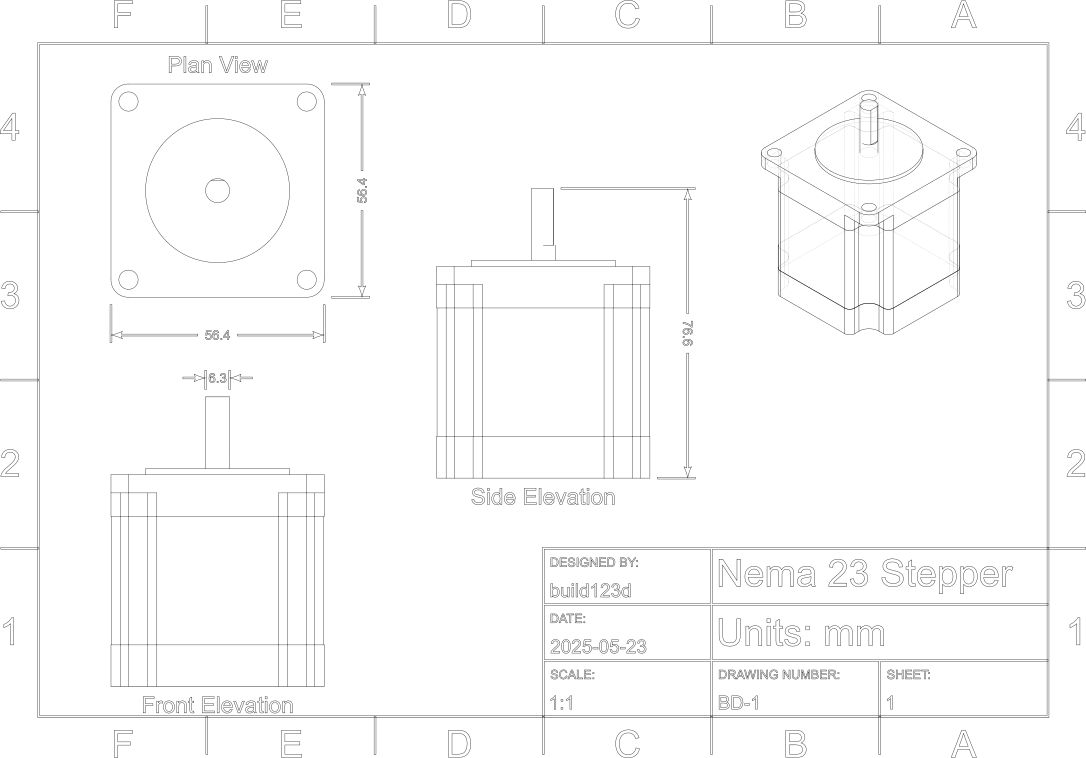
This example demonstrates how to generate a standard technical drawing of a 3D part using build123d. It creates orthographic and isometric views of a Nema 23 stepper motor and exports the result as an SVG file suitable for printing or inspection.
Overview
A technical drawing represents a 3D object in 2D using a series of standardized views. These include:
Plan (Top View) – as seen from directly above (Z-axis down)
Front Elevation – looking at the object head-on (Y-axis forward)
Side Elevation (Right Side) – viewed from the right (X-axis)
Isometric Projection – a 3D perspective view to help visualize depth
Each view is aligned to a position on the page and optionally scaled or annotated.
How It Works
The script uses the project_to_viewport method to project the 3D part geometry into 2D. A helper function, project_to_2d, sets up the viewport (camera origin and up direction) and places the result onto a virtual drawing sheet.
The steps involved are:
Load or construct a 3D part (in this case, a stepper motor).
Define a TechnicalDrawing border and title block using A4 page size.
Generate each of the standard views and apply transformations to place them.
Add dimensions using ExtensionLine and labels using Text.
Export the drawing using ExportSVG, separating visible and hidden edges by layer and style.
Result
Try It Yourself
You can modify the script to:
Replace the part with your own Part model
Adjust camera angles and scale
Add other views (bottom, rear)
Enhance with more labels and dimensions
Code
from datetime import date

from bd_warehouse.open_builds import StepperMotor
from build123d import *
from ocp_vscode import show


def project_to_2d(
    part: Part,
    viewport_origin: VectorLike,
    viewport_up: VectorLike,
    page_origin: VectorLike,
    scale_factor: float = 1.0,
) -> tuple[ShapeList[Edge], ShapeList[Edge]]:
    """project_to_2d

    Helper function to generate 2d views translated on the 2d page.

    Args:
        part (Part): 3d object
        viewport_origin (VectorLike): location of viewport
        viewport_up (VectorLike): direction of the viewport Y axis
        page_origin (VectorLike): center of 2d object on page
        scale_factor (float, optional): part scalar. Defaults to 1.0.

    Returns:
        tuple[ShapeList[Edge], ShapeList[Edge]]: visible & hidden edges
    """
    scaled_part = part if scale_factor == 1.0 else scale(part, scale_factor)
    visible, hidden = scaled_part.project_to_viewport(
        viewport_origin, viewport_up, look_at=(0, 0, 0)
    )
    visible = [Pos(*page_origin) * e for e in visible]
    hidden = [Pos(*page_origin) * e for e in hidden]

    return ShapeList(visible), ShapeList(hidden)


# The object that appearing in the drawing
stepper: Part = StepperMotor("Nema23")

# Create a standard technical drawing border on A4 paper
border = TechnicalDrawing(
    designed_by="build123d",
    design_date=date.fromisoformat("2025-05-23"),
    page_size=PageSize.A4,
    title="Nema 23 Stepper",
    sub_title="Units: mm",
    drawing_number="BD-1",
    sheet_number=1,
    drawing_scale=1,
)
page_size = border.bounding_box().size

# Specify the drafting options for extension lines
drafting_options = Draft(font_size=3.5, decimal_precision=1, display_units=False)

# Lists used to store the 2d visible and hidden lines
visible_lines, hidden_lines = [], []

# Isometric Projection - A 3D view where the part is rotated to reveal three
# dimensions equally.
iso_v, iso_h = project_to_2d(
    stepper,
    (100, 100, 100),
    (0, 0, 1),
    page_size * 0.3,
    0.75,
)
visible_lines.extend(iso_v)
hidden_lines.extend(iso_h)

# Plan View (Top) - The view from directly above the part (looking down along
# the Z-axis).
vis, _ = project_to_2d(
    stepper,
    (0, 0, 100),
    (0, 1, 0),
    (page_size.X * -0.3, page_size.Y * 0.25),
)
visible_lines.extend(vis)

# Dimension the top of the stepper
top_bbox = Curve(vis).bounding_box()
perimeter = Pos(*top_bbox.center()) * Rectangle(top_bbox.size.X, top_bbox.size.Y)
d1 = ExtensionLine(
    border=perimeter.edges().sort_by(Axis.X)[-1], offset=1 * CM, draft=drafting_options
)
d2 = ExtensionLine(
    border=perimeter.edges().sort_by(Axis.Y)[0], offset=1 * CM, draft=drafting_options
)
# Add a label
l1 = Text("Plan View", 6)
l1.position = vis.sort_by(Axis.Y)[-1].center() + (0, 5 * MM)

# Front Elevation - The primary view, typically looking along the Y-axis,
# showing the height.
vis, _ = project_to_2d(
    stepper,
    (0, -100, 0),
    (0, 0, 1),
    (page_size.X * -0.3, page_size.Y * -0.125),
)
visible_lines.extend(vis)
d3 = ExtensionLine(
    border=vis.sort_by(Axis.Y)[-1], offset=-5 * MM, draft=drafting_options
)
l2 = Text("Front Elevation", 6)
l2.position = vis.group_by(Axis.Y)[0].sort_by(Edge.length)[-1].center() + (0, -5 * MM)

# Side Elevation - Often refers to the Right Side View, looking along the X-axis.
vis, _ = project_to_2d(
    stepper,
    (100, 0, 0),
    (0, 0, 1),
    (0, page_size.Y * 0.15),
)
visible_lines.extend(vis)
side_bbox = Curve(vis).bounding_box()
shaft_top_corner = vis.edges().sort_by(Axis.Y)[-1].vertices().sort_by(Axis.X)[-1]
body_bottom_corner = (side_bbox.max.X, side_bbox.min.Y)
d4 = ExtensionLine(
    border=(shaft_top_corner, body_bottom_corner),
    offset=-(side_bbox.max.X - shaft_top_corner.X) - 1 * CM,  # offset to outside view.
    measurement_direction=(0, 1, 0),
    draft=drafting_options,
)
l3 = Text("Side Elevation", 6)
l3.position = vis.group_by(Axis.Y)[0].sort_by(Edge.length)[-1].center() + (0, -5 * MM)


# Initialize the SVG exporter
exporter = ExportSVG(unit=Unit.MM)
# Define visible and hidden line layers
exporter.add_layer("Visible")
exporter.add_layer("Hidden", line_color=(99, 99, 99), line_type=LineType.ISO_DOT)
# Add the objects to the appropriate layer
exporter.add_shape(visible_lines, layer="Visible")
exporter.add_shape(hidden_lines, layer="Hidden")
exporter.add_shape(border, layer="Visible")
exporter.add_shape([d1, d2, d3, d4], layer="Visible")
exporter.add_shape([l1, l2, l3], layer="Visible")
# Write the file
exporter.write(f"assets/stepper_drawing.svg")

show(border, visible_lines, d1, d2, d3, d4, l1, l2, l3)
Dependencies
This example depends on the following packages:
build123d
bd_warehouse (for the StepperMotor part)
ocp_vscode (for local preview)