Topology Selection and Exploration
Topology is the structure of build123d geometric features and traversing the
topology of a part is often required to specify objects for an operation or to locate a
CAD feature. Selectors allow selection of topology objects into a ShapeList.
Operators are powerful methods further explore and refine a ShapeList for
subsequent operations.
Selectors
Selectors provide methods to extract all or a subset of a feature type in the referenced
object. These methods select Edges, Faces, Solids, Vertices, or Wires in Builder objects
or from Shape objects themselves. All of these methods return a ShapeList,
which is a subclass of list and may be sorted, grouped, or filtered by
Operators.
Overview
Selector |
Criteria |
Applicability |
Description |
|---|---|---|---|
ALL, LAST |
|
|
|
ALL, LAST, NEW |
|
|
|
ALL, LAST |
|
|
|
ALL, LAST |
|
|
|
ALL, LAST |
|
|
Both shape objects and builder objects have access to selector methods to select all of a feature as long as they can contain the feature being selected.
# In context
with BuildSketch() as context:
    Rectangle(1, 1)
    context.edges()

    # Build context implicitly has access to the selector
    edges()

# Taking the sketch out of context
context.sketch.edges()

# Create sketch out of context
Rectangle(1, 1).edges()
Select In Build Context
Build contexts track the last operation and their selector methods can take
Select as criteria to specify a subset of
features to extract. By default, a selector will select ALL of a feature, while
LAST selects features created or altered by the most recent operation. edges() can
uniquely specify NEW to only select edges created in the last operation which neither
existed in the referenced object before the last operation, nor the modifying object.
重要
Select as selector criteria is only valid for builder objects!
# In context
with BuildPart() as context:
    Box(2, 2, 1)
    Cylinder(1, 2)
    context.edges(Select.LAST)

# Does not work out of context!
context.part.edges(Select.LAST)
(Box(2, 2, 1) + Cylinder(1, 2)).edges(Select.LAST)
Create a simple part to demonstrate selectors. Select using the default criteria
Select.ALL. Specifying Select.ALL for the selector is not required.
with BuildPart() as part:
    Box(5, 5, 1)
    Cylinder(1, 5)

    part.vertices()
    part.edges()
    part.faces()

    # Is the same as
    part.vertices(Select.ALL)
    part.edges(Select.ALL)
    part.faces(Select.ALL)

The default Select.ALL features
Select features changed in the last operation with criteria Select.LAST.
with BuildPart() as part:
    Box(5, 5, 1)
    Cylinder(1, 5)

    part.vertices(Select.LAST)
    part.edges(Select.LAST)
    part.faces(Select.LAST)
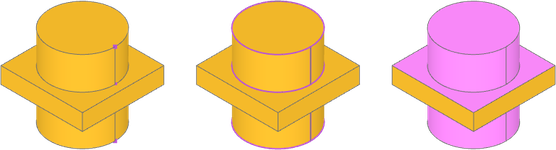
Select.LAST features
Select only new edges from the last operation with Select.NEW. This option is only
available for a ShapeList of edges!
with BuildPart() as part:
    Box(5, 5, 1)
    Cylinder(1, 5)

    part.edges(Select.NEW)
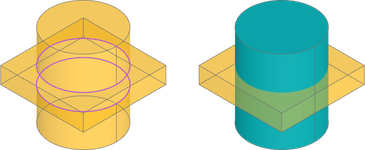
Select.NEW edges where box and cylinder intersect
This only returns new edges which are not reused from Box or Cylinder, in this case where the objects intersect. But what happens if the objects don't intersect and all the edges are reused?
with BuildPart() as part:
    Box(5, 5, 1, align=(Align.CENTER, Align.CENTER, Align.MAX))
    Cylinder(2, 2, align=(Align.CENTER, Align.CENTER, Align.MIN))

    part.edges(Select.NEW)
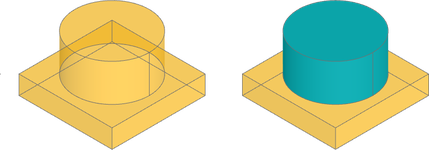
Select.NEW edges when box and cylinder don't intersect
No edges are selected! Unlike the previous example, the Edge between the Box and Cylinder
objects is an edge reused from the Cylinder. Think of Select.NEW as a way to select
only completely new edges created by the operation.
注釈
Chamfer and fillet modify the current object, but do not have new edges via
Select.NEW.
with BuildPart() as part:
    Box(5, 5, 1)
    Cylinder(1, 5)
    edges = part.edges().filter_by(lambda a: a.length == 1)
    fillet(edges, 1)

    part.edges(Select.NEW)
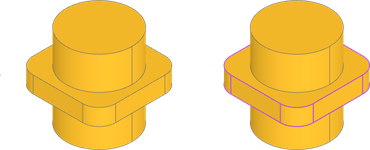
Left, Select.NEW returns no edges after fillet. Right, Select.LAST
Select New Edges In Algebra Mode
The utility method new_edges compares one or more shape objects to a
another "combined" shape object and returns the edges new to the combined shape.
new_edges is available both Algebra mode or Builder mode, but is necessary in
Algebra Mode where Select.NEW is unavailable
box = Box(5, 5, 1)
circle = Cylinder(2, 5)
part = box + circle
edges = new_edges(box, circle, combined=part)
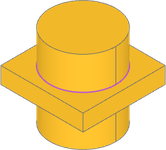
new_edges can also find edges created during a chamfer or fillet operation by
comparing the object before the operation to the "combined" object.
box = Box(5, 5, 1)
circle = Cylinder(2, 5)
part_before = box + circle
edges = part_before.edges().filter_by(lambda a: a.length == 1)
part = fillet(edges, 1)
edges = new_edges(part_before, combined=part)
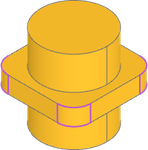
Operators
Operators provide methods refine a ShapeList of features isolated by a selector to
further specify feature(s). These methods can sort, group, or filter ShapeList
objects and return a modified ShapeList, or in the case of group_by(), GroupBy,
a list of ShapeList objects accessible by index or key.
Overview
Method |
Criteria |
Description |
|---|---|---|
|
Sort |
|
|
Sort |
|
|
Group |
|
|
Filter |
|
|
Filter |
Operator methods take criteria to refine ShapeList. Broadly speaking, the criteria
fall into the following categories, though not all operators take all criteria:
Sort
A ShapeList can be sorted with the sort_by() and sort_by_distance()
methods based on a sorting criteria. Sorting is a critical step when isolating individual
features as a ShapeList from a selector is typically unordered.
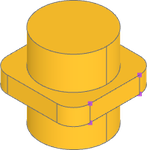
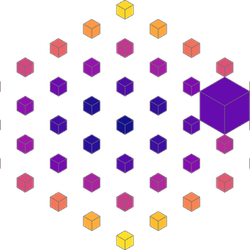
Here we want to capture some vertices from the object furthest along X: All the
vertices are first captured with the vertices() selector, then sort by Axis.X.
Finally, the vertices can be captured with a list slice for the last 4 list items, as the
items are sorted from least to greatest X position. Remember, ShapeList is a
subclass of list, so any list slice can be used.
part.vertices().sort_by(Axis.X)[-4:]
Examples
Group
A ShapeList can be grouped and sorted with the group_by() method based on a grouping
criteria. Grouping can be a great way to organize features without knowing the values of
specific feature properties. Rather than returning a ShapeList, group_by() returns
a GroupBy, a list of ShapeList objects sorted by the grouping criteria.
GroupBy can be printed to view the members of each group, indexed like a list to
retrieve a ShapeList, and be accessed using a key with the group method. If the
group keys are unknown they can be discovered with key_to_group_index.
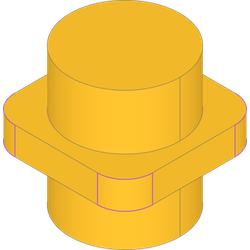
If we want only the edges from the smallest faces by area we can get the faces, then
group by SortBy.AREA. The ShapeList of smallest faces is available from the first
list index. Finally, a ShapeList has access to selectors, so calling edges() will
return a new list of all edges in the previous list.
part.faces().group_by(SortBy.AREA)[0].edges())
Topological Distance
topo_distance_to() creates a callable key that measures graph distance through
topology rather than geometric distance through space. It is useful when selecting
features by adjacency, for example faces connected to a reference face, or the next
ring of faces after that.
Distances are measured within the shared topo_parent of the reference shape. The
reference shape has distance 0, directly adjacent shapes have distance 1, and
unreachable shapes have distance inf.
box = Box(1, 1, 1)
faces = box.faces()
top_face = faces.sort_by(Axis.Z)[-1]

face_rings = faces.group_by(topo_distance_to(top_face))

top = face_rings[0]
sides = face_rings[1]
bottom = face_rings[2]
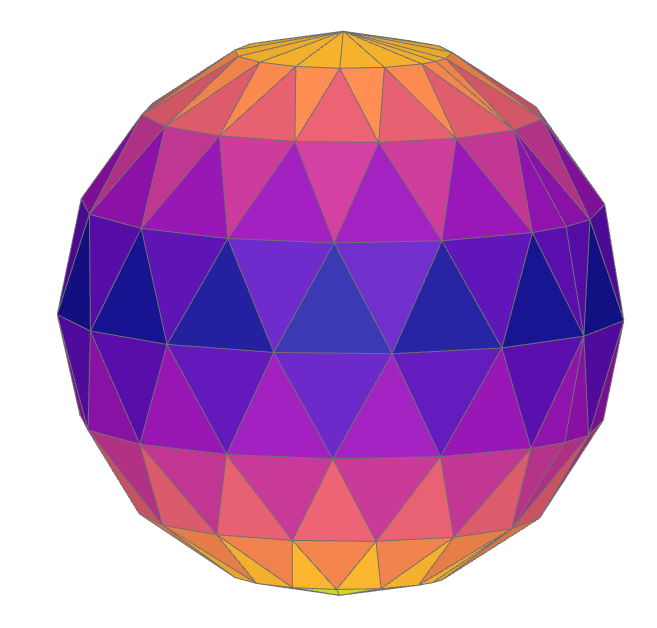
Multiple reference shapes can be provided. This is useful for selecting all features within a topological distance from any reference. In this example, a sphere is converted to a triangular mesh, faces near the middle of the mesh are used as references, and all mesh faces are grouped into topological rings expanding away from that starting band.
from build123d import *
from pathlib import Path
from tempfile import TemporaryDirectory

from ocp_vscode import ColorMap, show

mesher = Mesher()
mesher.add_shape(Sphere(1), linear_deflection=0.05, angular_deflection=1)

with TemporaryDirectory() as tmp_dir:
    mesh_path = Path(tmp_dir) / "sphere.stl"
    mesher.write(mesh_path)
    mesh_sphere = Mesher().read(mesh_path)[0]

sphere_faces = mesh_sphere.faces()

vertical_groups = sphere_faces.group_by(Axis.Z)
starting_ring = vertical_groups[len(vertical_groups) // 2]
face_rings = sphere_faces.group_by(topo_distance_to(starting_ring))

show(*face_rings, colors=ColorMap.listed(len(face_rings)))
The same approach can be used with edges or vertices. For example, a single edge on the mesh can be used as the starting point for edge-distance rings.
sphere_edges = mesh_sphere.edges()
reference_edge = choice(sphere_edges)
edge_rings = sphere_edges.group_by(topo_distance_to(reference_edge))
Examples
Filter
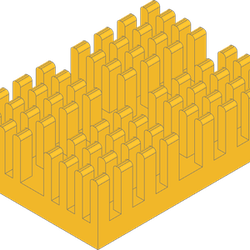
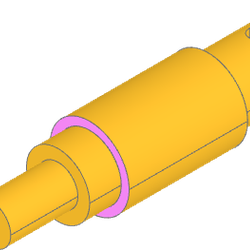
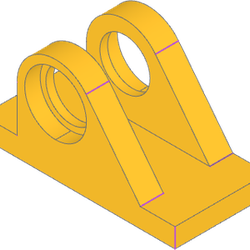
A ShapeList can be filtered with the filter_by() and filter_by_position() methods based
on a filtering criteria. Filters are flexible way to isolate (or exclude) features based
on known criteria.
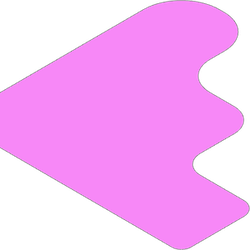
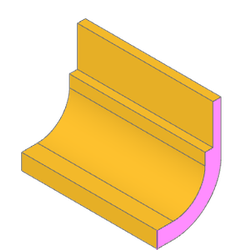
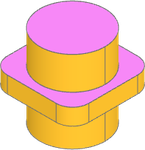
Lets say we need all the faces with a normal in the +Z direction. One way to do this
might be with a list comprehension, however filter_by() has the capability to take a
lambda function as a filter condition on the entire list. In this case, the normal of
each face can be checked against a vector direction and filtered accordingly.
part.faces().filter_by(lambda f: f.normal_at() == Vector(0, 0, 1))
Examples