Direct API Reference
The Direct API is an interface layer between the primary user interface API (the Builders) and the OpenCascade (OCCT) API. This API is based on the CadQuery Direct API (thank you to all of the CadQuery contributors that made this possible) with the following major changes:
PEP8 compliance
New Axis class
New ShapeList class enabling sorting and filtering of shape objects
Literal strings replaced with Enums
Geometric Objects
The geometric classes defined by build123d are defined below. This parameters to the CAD objects described in the following section are frequently of these types.
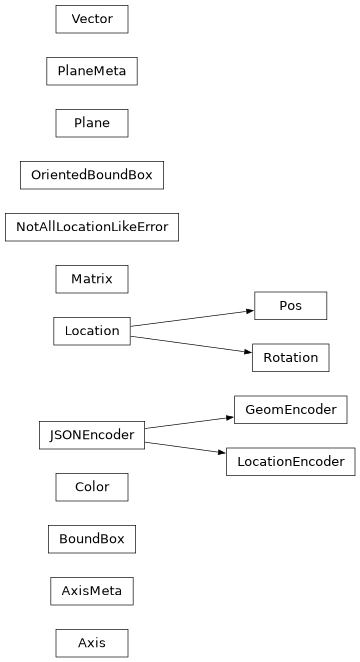
- class Axis(*args: Any, **kwargs: Any)
Axis defined by point and direction or by two points
- パラメータ:
- 変数:
- angle_between(other: Axis) float
calculate angle between axes
Computes the angular value, in degrees, between the direction of self and other between 0° and 360°.
- パラメータ:
other (Axis) -- axis to compare to
- 戻り値:
angle between axes
- 戻り値の型:
float
- intersect(*args, **kwargs)
Find intersection of axis and geometric object or shape
- is_coaxial(other: Axis, angular_tolerance: float = 1e-05, linear_tolerance: float = 1e-05) bool
are axes coaxial
True if the angle between self and other is lower or equal to angular_tolerance and the distance between self and other is lower or equal to linear_tolerance.
- パラメータ:
other (Axis) -- axis to compare to
angular_tolerance (float, optional) -- max angular deviation. Defaults to 1e-5.
linear_tolerance (float, optional) -- max linear deviation. Defaults to 1e-5.
- 戻り値:
axes are coaxial
- 戻り値の型:
bool
- is_normal(other: Axis, angular_tolerance: float = 1e-05) bool
are axes normal
Returns True if the direction of this and another axis are normal to each other. That is, if the angle between the two axes is equal to 90° within the angular_tolerance.
- パラメータ:
other (Axis) -- axis to compare to
angular_tolerance (float, optional) -- max angular deviation. Defaults to 1e-5.
- 戻り値:
axes are normal
- 戻り値の型:
bool
- is_opposite(other: Axis, angular_tolerance: float = 1e-05) bool
are axes opposite
Returns True if the direction of this and another axis are parallel with opposite orientation. That is, if the angle between the two axes is equal to 180° within the angular_tolerance.
- パラメータ:
other (Axis) -- axis to compare to
angular_tolerance (float, optional) -- max angular deviation. Defaults to 1e-5.
- 戻り値:
axes are opposite
- 戻り値の型:
bool
- is_parallel(other: Axis, angular_tolerance: float = 1e-05) bool
are axes parallel
Returns True if the direction of this and another axis are parallel with same orientation or opposite orientation. That is, if the angle between the two axes is equal to 0° or 180° within the angular_tolerance.
- パラメータ:
other (Axis) -- axis to compare to
angular_tolerance (float, optional) -- max angular deviation. Defaults to 1e-5.
- 戻り値:
axes are parallel
- 戻り値の型:
bool
- is_skew(other: Axis, tolerance: float = 1e-05) bool
are axes skew
Returns True if this axis and another axis are skew, meaning they are neither parallel nor coplanar. Two axes are skew if they do not lie in the same plane and never intersect.
Mathematically, this means:
The axes are not parallel (the cross product of their direction vectors is nonzero).
The axes are not coplanar (the vector between their positions is not aligned with the plane spanned by their directions).
If either condition is false (i.e., the axes are parallel or coplanar), they are not skew.
- パラメータ:
other (Axis) -- axis to compare to
tolerance (float, optional) -- max deviation. Defaults to 1e-5.
- 戻り値:
axes are skew
- 戻り値の型:
bool
- located(new_location: Location)
relocates self to a new location possibly changing position and direction
- property wrapped
OCP object
- class BoundBox(*args, **kwargs)
A BoundingBox for a Shape
- add(obj: tuple[float, float, float] | Vector | BoundBox, tol: float | None = None) BoundBox
Returns a modified (expanded) bounding box
- obj can be one of several things:
a 3-tuple corresponding to x,y, and z amounts to add
a vector, containing the x,y,z values to add
another bounding box, where a new box will be created that encloses both.
This bounding box is not changed.
- パラメータ:
obj -- tuple[float, float, float] | Vector | BoundBox]:
tol -- float: (Default value = None)
Returns:
- property diagonal: float
body diagonal length (i.e. object maximum size)
- static find_outside_box_2d(bb1: BoundBox, bb2: BoundBox) BoundBox | None
Compares bounding boxes
Compares bounding boxes. Returns none if neither is inside the other. Returns the outer one if either is outside the other.
BoundBox.is_inside works in 3d, but this is a 2d bounding box, so it doesn't work correctly plus, there was all kinds of rounding error in the built-in implementation i do not understand.
- パラメータ:
bb1 -- BoundBox:
bb2 -- BoundBox:
Returns:
- classmethod from_topo_ds(shape: TopoDS_Shape, tolerance: float | None = None, optimal: bool = True) BoundBox
Constructs a bounding box from a TopoDS_Shape
- パラメータ:
shape -- TopoDS_Shape:
tolerance -- float: (Default value = None)
optimal -- bool: This algorithm builds precise bounding box (Default value = True)
Returns:
- is_inside(second_box: BoundBox) bool
Is the provided bounding box inside this one?
- パラメータ:
b2 -- BoundBox:
Returns:
- property measure: float
Return the overall Lebesgue measure of the bounding box.
For 1D objects: length
For 2D objects: area
For 3D objects: volume
- class Color(*args, **kwargs)
Color object based on OCCT Quantity_ColorRGBA.
- 変数:
wrapped (Quantity_ColorRGBA) -- the OCP color object
- classmethod categorical_set(color_count: int, starting_hue: str | tuple[str, float | int] | tuple[float | int, float | int, float | int] | tuple[float | int, float | int, float | int, float | int] | int | tuple[int, int] | Color | Quantity_ColorRGBA | float = 0.0, alpha: float | Iterable[float] = 1.0) list[Color]
Generate a palette of evenly spaced colors.
Creates a list of visually distinct colors suitable for representing discrete categories (such as different parts, assemblies, or data series). Colors are evenly spaced around the hue circle and share consistent lightness and saturation levels, resulting in balanced perceptual contrast across all hues.
Produces palettes similar in appearance to the Tableau 10 and D3 Category10 color sets—both widely recognized standards in data visualization for their clarity and accessibility. These values have been empirically chosen to maintain consistent perceived brightness across hues while avoiding overly vivid or dark colors.
- パラメータ:
color_count (int) -- Number of colors to generate.
starting_hue (ColorLike | float) -- Either a Color-like object or a hue value in the range [0.0, 1.0] that defines the starting color.
alpha (float | Iterable[float]) -- Alpha value(s) for the colors. Can be a single float or an iterable of length color_count.
- 戻り値:
List of generated colors.
- 戻り値の型:
list[Color]
- 例外:
ValueError -- If starting_hue is out of range or alpha length mismatch.
- class Location(*args: Any, **kwargs: Any)
Location in 3D space. Depending on usage can be absolute or relative.
This class wraps the TopLoc_Location class from OCCT. It can be used to move Shape objects in both relative and absolute manner. It is the preferred type to locate objects in build123d.
- 変数:
wrapped (TopLoc_Location) -- the OCP location object
- __eq__(other: object) bool
Compare Locations
- intersect(*args, **kwargs)
Find intersection of location and geometric object or shape
- mirror(mirror_plane: Plane) Location
Return a new Location mirrored across the given plane.
This method reflects both the position and orientation of the current Location across the specified mirror_plane using affine vector mathematics.
- Due to the mathematical properties of reflection:
The true mirror of a right-handed coordinate system is a left-handed one.
However, build123d requires all coordinate systems to be right-handed. Therefore, this implementation: - Reflects the X and Z directions across the mirror plane - Recomputes the Y direction as: Y = X × Z
This ensures the resulting Location maintains a valid right-handed frame, while remaining as close as possible to the geometric mirror.
- property orientation: Vector
Extract orientation/rotation component of self
- 戻り値:
orientation part of Location
- 戻り値の型:
- to_tuple() tuple[tuple[float, float, float], tuple[float, float, float]]
Convert the location to a translation, rotation tuple.
- property wrapped: TopLoc_Location
OCP object
- class LocationEncoder(*, skipkeys=False, ensure_ascii=True, check_circular=True, allow_nan=True, sort_keys=False, indent=None, separators=None, default=None)
Custom JSON Encoder for Location values
Example:
data_dict = {
    "part1": {
        "joint_one": Location((1, 2, 3), (4, 5, 6)),
        "joint_two": Location((7, 8, 9), (10, 11, 12)),
    },
    "part2": {
        "joint_one": Location((13, 14, 15), (16, 17, 18)),
        "joint_two": Location((19, 20, 21), (22, 23, 24)),
    },
}
json_object = json.dumps(data_dict, indent=4, cls=LocationEncoder)
with open("sample.json", "w") as outfile:
    outfile.write(json_object)
with open("sample.json", "r") as infile:
    copy_data_dict = json.load(infile, object_hook=LocationEncoder.location_hook)
- static location_hook(obj) dict
Convert Locations loaded from json to Location objects
サンプル
read_json = json.load(infile, object_hook=LocationEncoder.location_hook)
- class Pos(*args, **kwargs)
A position only sub-class of Location
- class Matrix(*args, **kwargs)
A 3d , 4x4 transformation matrix.
Used to move geometry in space.
The provided "matrix" parameter may be None, a gp_GTrsf, or a nested list of values.
If given a nested list, it is expected to be of the form:
- [[m11, m12, m13, m14],
[m21, m22, m23, m24], [m31, m32, m33, m34]]
A fourth row may be given, but it is expected to be: [0.0, 0.0, 0.0, 1.0] since this is a transform matrix.
- 変数:
wrapped (gp_GTrsf) -- the OCP transformation function
- multiply(other)
Matrix multiplication
- transposed_list() Sequence[float]
Needed by the cqparts gltf exporter
- class Plane(*args: Any, **kwargs: Any)
A plane is positioned in space with a coordinate system such that the plane is defined by the origin, x_dir (X direction), y_dir (Y direction), and z_dir (Z direction) of this coordinate system, which is the "local coordinate system" of the plane. The z_dir is a vector normal to the plane. The coordinate system is right-handed.
A plane allows the use of local 2D coordinates, which are later converted to global, 3d coordinates when the operations are complete.
Planes can be created from faces as workplanes for feature creation on objects.
Name
x_dir
y_dir
z_dir
XY
+x
+y
+z
YZ
+y
+z
+x
ZX
+z
+x
+y
XZ
+x
+z
-y
YX
+y
+x
-z
ZY
+z
+y
-x
front
+x
+z
-y
back
-x
+z
+y
left
-y
+z
-x
right
+y
+z
+x
top
+x
+y
+z
bottom
+x
-y
-z
isometric
+x+y
-x+y+z
+x+y-z
- パラメータ:
gp_pln (gp_Pln) -- an OCCT plane object
origin (tuple[float, float, float] | Vector) -- the origin in global coordinates
x_dir (tuple[float, float, float] | Vector | None) -- an optional vector representing the X Direction. Defaults to None.
y_dir (tuple[float, float, float] | Vector | None) -- optional Y direction. Mutually exclusive with z_dir. Requires x_dir.
z_dir (tuple[float, float, float] | Vector | None) -- the normal direction for the plane. Defaults to (0, 0, 1).
- 変数:
origin (Vector) -- global position of local (0,0,0) point
x_dir (Vector) -- x direction
y_dir (Vector) -- y direction
z_dir (Vector) -- z direction
forward_transform (Matrix) -- forward location transformation matrix
reverse_transform (Matrix) -- reverse location transformation matrix
wrapped (gp_Pln) -- the OCP plane object
- 例外:
ValueError -- z_dir must be non null
ValueError -- y_dir must be non null
ValueError -- x_dir must be non null
ValueError -- the specified x_dir is not orthogonal to the provided normal
ValueError -- x_dir and y_dir must not be parallel
ValueError -- the specified x_dir is not orthogonal to the provided normal
- 戻り値:
A plane
- 戻り値の型:
- __eq__(other: object)
Are planes equal operator ==
- contains(obj: Vector | tuple[float, float] | tuple[float, float, float] | Sequence[float] | Axis, tolerance: float = 1e-06) bool
Is this point or Axis fully contained in this plane?
- パラメータ:
obj (VectorLike | Axis) -- point or Axis to evaluate
tolerance (float, optional) -- comparison tolerance. Defaults to TOLERANCE.
- 戻り値:
self contains point or Axis
- 戻り値の型:
bool
- property forward_transform
forward location transformation matrix
- from_local_coords(obj: tuple | Vector | Any | BoundBox)
Reposition the object relative from this plane
- パラメータ:
obj -- VectorLike | Shape | BoundBox an object to reposition. Note that
classes. (type Any refers to all topological)
- 戻り値:
an object of the same type, but repositioned to world coordinates
- static get_topods_face_normal(face: TopoDS_Face) Vector
Find the normal at the center of a TopoDS_Face
- intersect(*args, **kwargs)
Find intersection of plane and geometric object or shape
- location_between(other: Plane) Location
Return a location representing the translation from self to other
- move(loc: Location | Plane) Plane
Change the position & orientation of self by applying a relative location
- moved(loc: Location | Plane) Plane
Change the position & orientation of a copy of self by applying a relative location
- property reverse_transform
reverse location transformation matrix
- rotated(rotation: Vector | tuple[float, float] | tuple[float, float, float] | Sequence[float] = (0, 0, 0), ordering: Extrinsic | Intrinsic | None = None) Plane
Returns a copy of this plane, rotated about the specified axes
The origin of the workplane is unaffected by the rotation.
Rotations are done in order x, y, z. If you need a different order, specify ordering. e.g. Intrinsic.ZYX changes rotation to (z angle, y angle, x angle) and rotates in that order.
- パラメータ:
rotation (VectorLike, optional) -- (x angle, y angle, z angle). Defaults to (0, 0, 0)
ordering (Intrinsic | Extrinsic, optional) -- order of rotations in Intrinsic or Extrinsic rotation mode. Defaults to Intrinsic.XYZ
- 戻り値:
a copy of this plane rotated as requested.
- 戻り値の型:
- shift_origin(locator: Axis | VectorLike | Vertex) Plane
shift plane origin
Creates a new plane with the origin moved within the plane to the point of intersection of the axis or at the given Vertex. The plane's x_dir and z_dir are unchanged.
- to_gp_ax2() gp_Ax2
Return gp_Ax2 version of the plane
- to_gp_ax3() gp_Ax3
Return gp_Ax3 version of the plane
- to_local_coords(obj: Vector | tuple[float, float] | tuple[float, float, float] | Sequence[float] | Any | BoundBox)
Reposition the object relative to this plane
- パラメータ:
obj -- VectorLike | Shape | BoundBox an object to reposition. Note that
classes. (type Any refers to all topological)
- 戻り値:
an object of the same type, but repositioned to local coordinates
- property wrapped: gp_Pln
The OCP object
- class Rotation(*args, **kwargs)
Subclass of Location used only for object rotation
- 変数:
X (float) -- rotation in degrees about X axis
Y (float) -- rotation in degrees about Y axis
Z (float) -- rotation in degrees about Z axis
enums, (optionally specify rotation ordering with Intrinsic or Extrinsic) -- defaults to Intrinsic.XYZ
- class Vector(*args, **kwargs)
Create a 3-dimensional vector
- パラメータ:
x (float) -- x component
y (float) -- y component
z (float) -- z component
vec (Vector | Sequence(float) | gp_Vec | gp_Pnt | gp_Dir | gp_XYZ) -- vector representations
Note that if no z value is provided it's assumed to be zero. If no values are provided the returned Vector has the value of 0, 0, 0.
- 変数:
wrapped (gp_Vec) -- the OCP vector object
- property X: float
Get x value
- property Y: float
Get y value
- property Z: float
Get z value
- __abs__() float
Vector length operator abs()
- __add__(vec: Vector | tuple[float, float] | tuple[float, float, float] | Sequence[float]) Vector
Mathematical addition operator +
- __eq__(other: object) bool
Vectors equal operator ==
- __sub__(vec: Vector | tuple[float, float] | tuple[float, float, float] | Sequence[float]) Vector
Mathematical subtraction operator -
- add(vec: Vector | tuple[float, float] | tuple[float, float, float] | Sequence[float]) Vector
Mathematical addition function
- center() Vector
- 戻り値:
The center of myself is myself. Provided so that vectors, vertices, and other shapes all support a common interface, when center() is requested for all objects on the stack.
- get_signed_angle(vec: Vector, normal: Vector | None = None) float
Signed Angle Between Vectors
Return the signed angle in degrees between two vectors with the given normal based on this math: angle = atan2((Va × Vb) ⋅ Vn, Va ⋅ Vb)
- intersect(*args, **kwargs)
Find intersection of vector and geometric object or shape
- property length: float
Vector length
- project_to_line(line: Vector) Vector
Returns a new vector equal to the projection of this Vector onto the line represented by Vector <line>
- project_to_plane(plane: Plane) Vector
Vector is projected onto the plane provided as input.
- パラメータ:
args -- Plane object
- Returns the projected vector.
plane: Plane:
Returns:
- rotate(axis: Axis, angle: float) Vector
Rotate about axis
Rotate about the given Axis by an angle in degrees
- sub(vec: Vector | tuple[float, float] | tuple[float, float, float] | Sequence[float]) Vector
Mathematical subtraction function
- to_dir() gp_Dir
Convert to OCCT gp_Dir object
- to_pnt() gp_Pnt
Convert to OCCT gp_Pnt object
- to_tuple() tuple[float, float, float]
Return tuple equivalent
- property wrapped: gp_Vec
OCCT object
Topological Objects
The topological object classes defined by build123d are defined below.
Note that the Mixin1D and Mixin3D classes add
supplementary functionality specific to 1D
(Edge and Wire) and 3D (Compound and
~topology.Solid) objects respectively.
Note that a Compound may be contain only 1D, 2D (Face) or 3D objects.
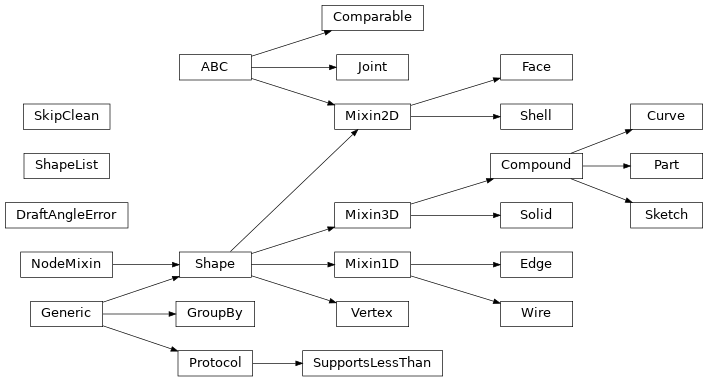
- class Compound(obj: TopoDS_Compound | Iterable[Shape] | None = None, label: str = '', color: Color | None = None, material: str = '', joints: dict[str, Joint] | None = None, parent: Compound | None = None, children: Sequence[Shape] | None = None)[ソース]
A Compound in build123d is a topological entity representing a collection of geometric shapes grouped together within a single structure. It serves as a container for organizing diverse shapes like edges, faces, or solids. This hierarchical arrangement facilitates the construction of complex models by combining simpler shapes. Compound plays a pivotal role in managing the composition and structure of intricate 3D models in computer-aided design (CAD) applications, allowing engineers and designers to work with assemblies of shapes as unified entities for efficient modeling and analysis.
- classmethod cast(obj: TopoDS_Shape) Vertex | Edge | Wire | Face | Shell | Solid | Compound[ソース]
Returns the right type of wrapper, given a OCCT object
- center(center_of: ~build123d.build_enums.CenterOf = <CenterOf.MASS>) Vector[ソース]
Return center of object
Find center of object
- do_children_intersect(include_parent: bool = False, tolerance: float = 1e-05) tuple[bool, tuple[Shape | None, Shape | None], float][ソース]
Do Children Intersect
Determine if any of the child objects within a Compound/assembly intersect by intersecting each of the shapes with each other and checking for a common volume.
- パラメータ:
include_parent (bool, optional) -- check parent for intersections. Defaults to False.
tolerance (float, optional) -- maximum allowable volume difference. Defaults to 1e-5.
- 戻り値:
do the object intersect, intersecting objects, volume of intersection
- 戻り値の型:
- classmethod extrude(obj: Shell, direction: Vector | tuple[float, float] | tuple[float, float, float] | Sequence[float]) Compound[ソース]
Extrude a Shell into a Compound.
- パラメータ:
direction (VectorLike) -- direction and magnitude of extrusion
- 例外:
ValueError -- Unsupported class
RuntimeError -- Generated invalid result
- 戻り値:
extruded shape
- 戻り値の型:
- get_type(obj_type: type[Vertex] | type[Edge] | type[Face] | type[Shell] | type[Solid] | type[Wire]) list[Vertex | Edge | Face | Shell | Solid | Wire][ソース]
Extract the objects of the given type from a Compound. Note that this isn't the same as Faces() etc. which will extract Faces from Solids.
- classmethod make_text(txt: str, font_size: float, font: str = 'Arial', font_path: ~os.PathLike[str] | str | None = None, font_style: ~build123d.build_enums.FontStyle = <FontStyle.REGULAR>, text_align: tuple[~build123d.build_enums.TextAlign, ~build123d.build_enums.TextAlign] = (<TextAlign.CENTER>, <TextAlign.CENTER>), align: ~build123d.build_enums.Align | tuple[~build123d.build_enums.Align, ~build123d.build_enums.Align] | None = None, position_on_path: float = 0.0, text_path: ~topology.one_d.Edge | ~topology.one_d.Wire | None = None, single_line_width: float = 0.0) Compound[ソース]
Text that optionally follows a path.
The text that is created can be combined as with other sketch features by specifying a mode or rotated by the given angle. In addition, edges have been previously created with arc or segment, the text will follow the path defined by these edges. The start parameter can be used to shift the text along the path to achieve precise positioning.
- パラメータ:
txt (str) -- text to render
font_size (float) -- size of the font in model units
font (str, optional) -- font name. Defaults to "Arial"
font_path (PathLike | str, optional) -- system path to font file. Defaults to None
font_style (Font_Style, optional) -- font style, REGULAR, BOLD, BOLDITALIC, or ITALIC. Defaults to Font_Style.REGULAR
text_align (tuple[TextAlign, TextAlign], optional) -- horizontal text align LEFT, CENTER, or RIGHT. Vertical text align BOTTOM, CENTER, TOP, or TOPFIRSTLINE. Defaults to (TextAlign.CENTER, TextAlign.CENTER)
align (Align | tuple[Align, Align], optional) -- align MIN, CENTER, or MAX of object. Defaults to None
position_on_path (float, optional) -- the relative location on path to position the text, values must be between 0.0 and 1.0. Defaults to 0.0
text_path -- (Edge | Wire, optional): path for text to follow. Defaults to None Compound object containing multiple Shapes representing the text
single_line_width (float) -- width of outlined single line font. Defaults to 0.0
Examples:
fox = Compound.make_text(
    txt="The quick brown fox jumped over the lazy dog",
    font_size=10,
    position_on_path=0.1,
    text_path=jump_edge,
)
- order = 4.0
- project_to_viewport(viewport_origin: Vector | tuple[float, float] | tuple[float, float, float] | Sequence[float], viewport_up: Vector | tuple[float, float] | tuple[float, float, float] | Sequence[float] = (0, 0, 1), look_at: Vector | tuple[float, float] | tuple[float, float, float] | Sequence[float] | None = None, focus: float | None = None) tuple[ShapeList[Edge], ShapeList[Edge]][ソース]
Project a shape onto a viewport returning visible and hidden Edges.
- パラメータ:
viewport_origin (VectorLike) -- location of viewport
viewport_up (VectorLike, optional) -- direction of the viewport y axis. Defaults to (0, 0, 1).
look_at (VectorLike, optional) -- point to look at. Defaults to None (center of shape).
focus (float, optional) -- the focal length for perspective projection Defaults to None (orthographic projection)
- 戻り値:
visible & hidden Edges
- 戻り値の型:
- touch(other: Shape, tolerance: float = 1e-06) ShapeList[Vertex | Edge | Face][ソース]
Distribute touch over compound elements.
Iterates over elements and collects touch results. Only Solid and Face elements produce boundary contacts; other shapes return empty.
- パラメータ:
other -- Shape to check boundary contacts with
tolerance -- tolerance for contact detection
- 戻り値:
ShapeList of boundary contact geometry (empty if no contact)
- unwrap(fully: bool = True) Self | Shape[ソース]
Strip unnecessary Compound wrappers
- パラメータ:
fully (bool, optional) -- return base shape without any Compound wrappers (otherwise one Compound is left). Defaults to True.
- 戻り値:
base shape
- 戻り値の型:
Union[Self, Shape]
- property volume: float
volume - the volume of this Compound
- class Edge(obj: TopoDS_Edge | Axis | None | None = None, label: str = '', color: Color | None = None, parent: Compound | None = None)[ソース]
An Edge in build123d is a fundamental element in the topological data structure representing a one-dimensional geometric entity within a 3D model. It encapsulates information about a curve, which could be a line, arc, or other parametrically defined shape. Edge is crucial in for precise modeling and manipulation of curves, facilitating operations like filleting, chamfering, and Boolean operations. It serves as a building block for constructing complex structures, such as wires and faces.
- property arc_center: Vector
center of an underlying circle or ellipse geometry.
- distribute_locations(count: int, start: float = 0.0, stop: float = 1.0, positions_only: bool = False) list[Location][ソース]
Distribute Locations
Distribute locations along edge or wire.
- パラメータ:
self -- Wire:Edge:
count (int) -- Number of locations to generate
start (float) -- position along Edge|Wire to start. Defaults to 0.0.
stop (float) -- position along Edge|Wire to end. Defaults to 1.0.
positions_only (bool) -- only generate position not orientation. Defaults to False.
- 戻り値:
locations distributed along Edge|Wire
- 戻り値の型:
list[Location]
- 例外:
ValueError -- count must be two or greater
- classmethod extrude(obj: Vertex, direction: Vector | tuple[float, float] | tuple[float, float, float] | Sequence[float]) Edge[ソース]
Extrude a Vertex into an Edge.
- パラメータ:
direction (VectorLike) -- direction and magnitude of extrusion
- 例外:
ValueError -- Unsupported class
RuntimeError -- Generated invalid result
- 戻り値:
extruded shape
- 戻り値の型:
- find_intersection_points(other: Axis | Edge | None = None, tolerance: float = 1e-06) ShapeList[Vector][ソース]
Determine the points where a 2D edge crosses itself or another 2D edge
- find_tangent(angle: float) list[float][ソース]
Find the parameter values of self where the tangent is equal to angle.
- パラメータ:
angle (float) -- target angle in degrees
- 戻り値:
u values between 0.0 and 1.0
- 戻り値の型:
list[float]
- geom_equal(other: Edge, tol: float = 1e-06, num_interpolation_points: int = 5) bool[ソース]
Compare two edges for geometric equality within tolerance.
This compares the geometric properties of two edges, not their topological identity. Two independently created edges with the same geometry will return True.
- パラメータ:
other -- Edge to compare with
tol -- Tolerance for numeric comparisons. Defaults to 1e-6.
num_interpolation_points -- Number of points to sample for unknown curve types. Defaults to 5.
- 戻り値:
True if edges are geometrically equal within tolerance
- 戻り値の型:
bool
- property is_infinite: bool
Check if edge is infinite (LINE with length > 1e100).
- classmethod make_bezier(*cntl_pnts: Vector | tuple[float, float] | tuple[float, float, float] | Sequence[float], weights: list[float] | None = None) Edge[ソース]
Create a rational (with weights) or non-rational bezier curve. The first and last control points represent the start and end of the curve respectively. If weights are provided, there must be one provided for each control point.
- パラメータ:
cntl_pnts (sequence[VectorLike]) -- points defining the curve
weights (list[float], optional) -- control point weights list. Defaults to None.
- 例外:
ValueError -- Too few control points
ValueError -- Too many control points
ValueError -- A weight is required for each control point
- 戻り値:
bezier curve
- 戻り値の型:
- classmethod make_bspline(control_points: Iterable[Vector | tuple[float, float] | tuple[float, float, float] | Sequence[float]], knots: Iterable[float], degree: int, weights: Iterable[float] | None = None, periodic: bool = False) Edge[ソース]
Create an exact B-spline edge from control points and knot data.
- パラメータ:
control_points (Iterable[VectorLike]) -- Control points (poles) defining the spline shape.
knots (Iterable[float]) -- Knot sequence for the spline. Repeated knot values are converted to unique knot values plus multiplicities.
degree (int) -- Polynomial degree of the spline.
weights (Iterable[float] | None, optional) -- Optional per-control-point weights for rational B-splines. Defaults to
None.periodic (bool, optional) -- Whether to create a periodic spline. Defaults to
False.
- 例外:
ValueError -- B-spline requires at least one knot.
- 戻り値:
the B-spline edge
- 戻り値の型:
- classmethod make_circle(radius: float, plane: ~build123d.geometry.Plane = Plane((0, 0, 0), (1, 0, 0), (0, 0, 1)), start_angle: float = 360.0, end_angle: float = 360, angular_direction: ~build123d.build_enums.AngularDirection = <AngularDirection.COUNTER_CLOCKWISE>) Edge[ソース]
make circle
Create a circle centered on the origin of plane
- パラメータ:
radius (float) -- circle radius
plane (Plane, optional) -- base plane. Defaults to Plane.XY.
start_angle (float, optional) -- start of arc angle. Defaults to 360.0.
end_angle (float, optional) -- end of arc angle. Defaults to 360.
angular_direction (AngularDirection, optional) -- arc direction. Defaults to AngularDirection.COUNTER_CLOCKWISE.
- 戻り値:
full or partial circle
- 戻り値の型:
- classmethod make_constrained_arcs(tangency_one: tuple[Axis | Edge, Tangency] | Axis | Edge | Vertex | Vector | tuple[float, float] | tuple[float, float, float] | Sequence[float], tangency_two: tuple[Axis | Edge, Tangency] | Axis | Edge | Vertex | Vector | tuple[float, float] | tuple[float, float, float] | Sequence[float], *, radius: float, sagitta: Sagitta = Sagitta.SHORT) ShapeList[Edge][ソース]
- classmethod make_constrained_arcs(tangency_one: tuple[Axis | Edge, Tangency] | Axis | Edge | Vertex | Vector | tuple[float, float] | tuple[float, float, float] | Sequence[float], tangency_two: tuple[Axis | Edge, Tangency] | Axis | Edge | Vertex | Vector | tuple[float, float] | tuple[float, float, float] | Sequence[float], *, center_on: Axis | Edge, sagitta: Sagitta = Sagitta.SHORT) ShapeList[Edge]
- classmethod make_constrained_arcs(tangency_one: tuple[Axis | Edge, Tangency] | Axis | Edge | Vertex | Vector | tuple[float, float] | tuple[float, float, float] | Sequence[float], tangency_two: tuple[Axis | Edge, Tangency] | Axis | Edge | Vertex | Vector | tuple[float, float] | tuple[float, float, float] | Sequence[float], tangency_three: tuple[Axis | Edge, Tangency] | Axis | Edge | Vertex | Vector | tuple[float, float] | tuple[float, float, float] | Sequence[float], *, sagitta: Sagitta = Sagitta.SHORT) ShapeList[Edge]
- classmethod make_constrained_arcs(tangency_one: tuple[Axis | Edge, Tangency] | Axis | Edge | Vertex | Vector | tuple[float, float] | tuple[float, float, float] | Sequence[float], *, center: Vector | tuple[float, float] | tuple[float, float, float] | Sequence[float]) ShapeList[Edge]
- classmethod make_constrained_arcs(tangency_one: tuple[Axis | Edge, Tangency] | Axis | Edge | Vertex | Vector | tuple[float, float] | tuple[float, float, float] | Sequence[float], *, radius: float, center_on: Edge) ShapeList[Edge]
- classmethod make_constrained_lines(tangency_one: tuple[Edge, Tangency] | Axis | Edge, tangency_two: tuple[Edge, Tangency] | Axis | Edge) ShapeList[Edge][ソース]
- classmethod make_constrained_lines(tangency_one: tuple[Edge, Tangency] | Edge, tangency_two: Vector) ShapeList[Edge]
- classmethod make_constrained_lines(tangency_one: tuple[Edge, Tangency] | Edge, tangency_two: Axis, *, angle: float | None = None, direction: Vector | tuple[float, float] | tuple[float, float, float] | Sequence[float] | None = None) ShapeList[Edge]
Create planar line(s) on XY subject to tangency/contact constraints.
Supported cases
Tangent to two curves
Tangent to one curve and passing through a given point
- classmethod make_ellipse(x_radius: float, y_radius: float, plane: ~build123d.geometry.Plane = Plane((0, 0, 0), (1, 0, 0), (0, 0, 1)), start_angle: float = 360.0, end_angle: float = 360.0, angular_direction: ~build123d.build_enums.AngularDirection = <AngularDirection.COUNTER_CLOCKWISE>) Edge[ソース]
make ellipse
Makes an ellipse centered at the origin of plane.
- パラメータ:
x_radius (float) -- x radius of the ellipse (along the x-axis of plane)
y_radius (float) -- y radius of the ellipse (along the y-axis of plane)
plane (Plane, optional) -- base plane. Defaults to Plane.XY.
start_angle (float, optional) -- Defaults to 360.0.
end_angle (float, optional) -- Defaults to 360.0.
angular_direction (AngularDirection, optional) -- arc direction. Defaults to AngularDirection.COUNTER_CLOCKWISE.
- 戻り値:
full or partial ellipse
- 戻り値の型:
- classmethod make_helix(pitch: float, height: float, radius: float, center: Vector | tuple[float, float] | tuple[float, float, float] | Sequence[float] = (0, 0, 0), normal: Vector | tuple[float, float] | tuple[float, float, float] | Sequence[float] = (0, 0, 1), angle: float = 0.0, lefthand: bool = False) Wire[ソース]
Make a helix with a given pitch, height and radius. By default a cylindrical surface is used to create the helix. If the :angle: is set (the apex given in degree) a conical surface is used instead.
- パラメータ:
pitch (float) -- distance per revolution along normal
height (float) -- total height
radius (float)
center (VectorLike, optional) -- Defaults to (0, 0, 0).
normal (VectorLike, optional) -- Defaults to (0, 0, 1).
angle (float, optional) -- conical angle. Defaults to 0.0.
lefthand (bool, optional) -- Defaults to False.
- 戻り値:
helix
- 戻り値の型:
- classmethod make_hyperbola(x_radius: float, y_radius: float, plane: ~build123d.geometry.Plane = Plane((0, 0, 0), (1, 0, 0), (0, 0, 1)), start_angle: float = 360.0, end_angle: float = 360.0, angular_direction: ~build123d.build_enums.AngularDirection = <AngularDirection.COUNTER_CLOCKWISE>) Edge[ソース]
make hyperbola
Makes a hyperbola centered at the origin of plane.
- パラメータ:
x_radius (float) -- x radius of the hyperbola (along the x-axis of plane)
y_radius (float) -- y radius of the hyperbola (along the y-axis of plane)
plane (Plane, optional) -- base plane. Defaults to Plane.XY.
start_angle (float, optional) -- Defaults to 360.0.
end_angle (float, optional) -- Defaults to 360.0.
angular_direction (AngularDirection, optional) -- arc direction. Defaults to AngularDirection.COUNTER_CLOCKWISE.
- 戻り値:
full or partial hyperbola
- 戻り値の型:
- classmethod make_line(point1: Vector | tuple[float, float] | tuple[float, float, float] | Sequence[float], point2: Vector | tuple[float, float] | tuple[float, float, float] | Sequence[float]) Edge[ソース]
Create a line between two points
- パラメータ:
point1 -- VectorLike: that represents the first point
point2 -- VectorLike: that represents the second point
- 戻り値:
A linear edge between the two provided points
- classmethod make_mid_way(first: Edge, second: Edge, middle: float = 0.5) Edge[ソース]
make line between edges
Create a new linear Edge between the two provided Edges. If the Edges are parallel but in the opposite directions one Edge is flipped such that the mid way Edge isn't truncated.
- classmethod make_parabola(focal_length: float, plane: ~build123d.geometry.Plane = Plane((0, 0, 0), (1, 0, 0), (0, 0, 1)), start_angle: float = 0.0, end_angle: float = 90.0, angular_direction: ~build123d.build_enums.AngularDirection = <AngularDirection.COUNTER_CLOCKWISE>) Edge[ソース]
make parabola
Makes an parabola centered at the origin of plane.
- パラメータ:
focal_length (float) -- focal length the parabola (distance from the vertex to focus along the x-axis of plane)
plane (Plane, optional) -- base plane. Defaults to Plane.XY.
start_angle (float, optional) -- Defaults to 0.0.
end_angle (float, optional) -- Defaults to 90.0.
angular_direction (AngularDirection, optional) -- arc direction. Defaults to AngularDirection.COUNTER_CLOCKWISE.
- 戻り値:
full or partial parabola
- 戻り値の型:
- classmethod make_spline(points: list[Vector | tuple[float, float] | tuple[float, float, float] | Sequence[float]], tangents: list[Vector | tuple[float, float] | tuple[float, float, float] | Sequence[float]] | None = None, periodic: bool = False, parameters: list[float] | None = None, scale: bool = True, tol: float = 1e-06) Edge[ソース]
Spline
Interpolate a spline through the provided points.
- パラメータ:
points (list[VectorLike]) -- the points defining the spline
tangents (list[VectorLike], optional) -- start and finish tangent. Defaults to None.
periodic (bool, optional) -- creation of periodic curves. Defaults to False.
parameters (list[float], optional) -- the value of the parameter at each interpolation point. (The interpolated curve is represented as a vector-valued function of a scalar parameter.) If periodic == True, then len(parameters) must be len(interpolation points) + 1, otherwise len(parameters) must be equal to len(interpolation points). Defaults to None.
scale (bool, optional) -- whether to scale the specified tangent vectors before interpolating. Each tangent is scaled, so it's length is equal to the derivative of the Lagrange interpolated curve. I.e., set this to True, if you want to use only the direction of the tangent vectors specified by tangents , but not their magnitude. Defaults to True.
tol (float, optional) -- tolerance of the algorithm (consult OCC documentation). Used to check that the specified points are not too close to each other, and that tangent vectors are not too short. (In either case interpolation may fail.). Defaults to 1e-6.
- 例外:
ValueError -- Parameter for each interpolation point
ValueError -- Tangent for each interpolation point
ValueError -- B-spline interpolation failed
- 戻り値:
the spline
- 戻り値の型:
- classmethod make_spline_approx(points: list[Vector | tuple[float, float] | tuple[float, float, float] | Sequence[float]], tol: float = 0.001, smoothing: tuple[float, float, float] | None = None, min_deg: int = 1, max_deg: int = 6) Edge[ソース]
Approximate a spline through the provided points.
- パラメータ:
points (list[Vector])
tol (float, optional) -- tolerance of the algorithm. Defaults to 1e-3.
smoothing (Tuple[float, float, float], optional) -- optional tuple of 3 weights use for variational smoothing. Defaults to None.
min_deg (int, optional) -- minimum spline degree. Enforced only when smoothing is None. Defaults to 1.
max_deg (int, optional) -- maximum spline degree. Defaults to 6.
- 例外:
ValueError -- B-spline approximation failed
- 戻り値:
spline
- 戻り値の型:
- classmethod make_tangent_arc(start: Vector | tuple[float, float] | tuple[float, float, float] | Sequence[float], tangent: Vector | tuple[float, float] | tuple[float, float, float] | Sequence[float], end: Vector | tuple[float, float] | tuple[float, float, float] | Sequence[float]) Edge[ソース]
Tangent Arc
Makes a tangent arc from point start, in the direction of tangent and ends at end.
- パラメータ:
start (VectorLike) -- start point
tangent (VectorLike) -- start tangent
end (VectorLike) -- end point
- 戻り値:
circular arc
- 戻り値の型:
- classmethod make_three_point_arc(point1: Vector | tuple[float, float] | tuple[float, float, float] | Sequence[float], point2: Vector | tuple[float, float] | tuple[float, float, float] | Sequence[float], point3: Vector | tuple[float, float] | tuple[float, float, float] | Sequence[float]) Edge[ソース]
Three Point Arc
Makes a three point arc through the provided points
- パラメータ:
point1 (VectorLike) -- start point
point2 (VectorLike) -- middle point
point3 (VectorLike) -- end point
- 戻り値:
a circular arc through the three points
- 戻り値の型:
- order = 1.0
- param_at(position: float) float[ソース]
Map a normalized arc-length position to the underlying OCCT parameter.
Returns the native OCCT curve parameter corresponding to the given normalized position (0.0 → start, 1.0 → end). For closed/periodic edges, OCCT may return a value outside the edge's nominal parameter range [param_min, param_max] (e.g., by adding/subtracting multiples of the period). If you require a value folded into the edge's range, apply a modulo with the parameter span.
- パラメータ:
position (float) -- Normalized arc-length position along the shape, where 0.0 is the start and 1.0 is the end. Values outside [0.0, 1.0] are not validated and yield OCCT-dependent results.
- 戻り値:
OCCT parameter (for edges) or composite “edgeIndex + fraction” parameter (for wires), as described above.
- 戻り値の型:
float
- param_at_point(point: Vector | tuple[float, float] | tuple[float, float, float] | Sequence[float]) float[ソース]
Return the normalized parameter (∈ [0.0, 1.0]) of the location on this edge closest to point.
This method always returns a normalized parameter across the edge's full OCCT parameter range, even though the underlying OCP/OCCT queries work in native (non-normalized) parameters. It is robust to several OCCT quirks:
1) Vertex snap (fast path) If point coincides (within tolerance) with one of the edge's vertices, that vertex's OCCT parameter is used and normalized to [0, 1]. Note: for a closed edge, a vertex may represent both start and end; the mapping is therefore ambiguous and either end may be chosen.
2) Projection via GeomAPI_ProjectPointOnCurve The OCCT projector's LowerDistanceParameter() can legitimately return a value outside the edge's [param_min, param_max] (e.g., periodic curves or implementation behavior). The result is wrapped back into range using a modulo by the parameter span and then normalized to [0, 1]. The projected answer is accepted only if re-evaluating the 3D point at that normalized parameter is within tolerance of the input point.
3) Fallback numeric search (robust path) If the projector fails the validation, a bounded 1D search is performed over [0, 1] using progressive subdivision and local minimization of the 3D distance ‖edge(u) - point‖. The first minimum found under geometric resolution is returned.
- パラメータ:
point (VectorLike) -- A point expected to lie on this edge (within tolerance).
- 例外:
ValueError -- If point is not on the edge within tolerance.
ValueError -- Can't find param on empty edge
RuntimeError -- If no parameter can be found (e.g., extremely pathological curves or numerical failure).
- 戻り値:
Normalized parameter in [0.0, 1.0] corresponding to the point's closest location on the edge.
- 戻り値の型:
float
- project_to_shape(target_object: Shape, direction: Vector | tuple[float, float] | tuple[float, float, float] | Sequence[float] | None = None, center: Vector | tuple[float, float] | tuple[float, float, float] | Sequence[float] | None = None) ShapeList[Edge][ソース]
Project Edge
Project an Edge onto a Shape generating new wires on the surfaces of the object one and only one of direction or center must be provided. Note that one or more wires may be generated depending on the topology of the target object and location/direction of projection.
To avoid flipping the normal of a face built with the projected wire the orientation of the output wires are forced to be the same as self.
- パラメータ:
target_object -- Object to project onto
direction -- Parallel projection direction. Defaults to None.
center -- Conical center of projection. Defaults to None.
target_object -- Shape:
direction -- VectorLike: (Default value = None)
center -- VectorLike: (Default value = None)
- 戻り値:
Projected Edge(s)
- 例外:
ValueError -- Only one of direction or center must be provided
- reversed(reconstruct: bool = False) Edge[ソース]
Return a copy of self with the opposite orientation.
- パラメータ:
reconstruct (bool, optional) -- rebuild edge instead of setting OCCT flag. Defaults to False.
- 戻り値:
reversed
- 戻り値の型:
- trim(start: float | Vector | tuple[float, float] | tuple[float, float, float] | Sequence[float], end: float | Vector | tuple[float, float] | tuple[float, float, float] | Sequence[float]) Edge[ソース]
Create a new edge by keeping only the section between start and end.
- パラメータ:
start (float | VectorLike) -- 0.0 <= start < 1.0 or point on edge
end (float | VectorLike) -- 0.0 < end <= 1.0 or point on edge
- 例外:
TypeError -- invalid input, must be float or VectorLike
ValueError -- can't trim empty edge
- 戻り値:
trimmed edge
- 戻り値の型:
- trim_infinite(half_length: float) Edge[ソース]
Trim an infinite line edge to a finite length.
OCCT's boolean operations struggle with very long edges (length > 1e100). This method trims such edges to a reasonable size centered at edge.center().
For non-infinite edges, returns self unchanged.
- パラメータ:
half_length -- Half-length of the resulting edge
- 戻り値:
Trimmed edge if infinite, otherwise self
- trim_to_length(start: float | Vector | tuple[float, float] | tuple[float, float, float] | Sequence[float], length: float) Edge[ソース]
Create a new edge starting at the given normalized parameter of a given length.
- パラメータ:
start (float | VectorLike) -- 0.0 <= start < 1.0 or point on edge
length (float) -- target length
- 例外:
ValueError -- can't trim empty edge
- 戻り値:
trimmed edge
- 戻り値の型:
- class Face(obj: TopoDS_Face | Plane, label: str = '', color: Color | None = None, parent: Compound | None = None)[ソース]
- class Face(outer_wire: Wire, inner_wires: Iterable[Wire] | None = None, label: str = '', color: Color | None = None, parent: Compound | None = None)
A Face in build123d represents a 3D bounded surface within the topological data structure. It encapsulates geometric information, defining a face of a 3D shape. These faces are integral components of complex structures, such as solids and shells. Face enables precise modeling and manipulation of surfaces, supporting operations like trimming, filleting, and Boolean operations.
- property area_without_holes: float
Calculate the total surface area of the face, including the areas of any holes.
This property returns the overall area of the face as if the inner boundaries (holes) were filled in.
- 戻り値:
The total surface area, including the area of holes. Returns 0.0 if the face is empty.
- 戻り値の型:
float
- property axes_of_symmetry: list[Axis]
Computes and returns the axes of symmetry for a planar face.
The method determines potential symmetry axes by analyzing the face’s geometry:
It first validates that the face is non-empty and planar.
For faces with inner wires (holes), it computes the centroid of the holes and the face's overall center (COG).
If the holes' centroid significantly deviates from the COG (beyond a specified tolerance), the symmetry axis is taken along the line connecting these points; otherwise, each hole’s center is used to generate a candidate axis.
For faces without holes, candidate directions are derived by sampling midpoints along the outer wire's edges.
If curved edges are present, additional candidate directions are obtained from an oriented bounding box (OBB) constructed around the face.
For each candidate direction, the face is split by a plane (defined using the candidate direction and the face’s normal). The top half of the face is then mirrored across this plane, and if the area of the intersection between the mirrored half and the bottom half matches the bottom half’s area within a small tolerance, the direction is accepted as an axis of symmetry.
- 戻り値:
- A list of Axis objects, each defined by the face's
center and a direction vector, representing the symmetry axes of the face.
- 戻り値の型:
list[Axis]
- 例外:
ValueError -- If the face or its underlying representation is empty.
ValueError -- If the face is not planar.
- property axis_of_rotation: None | Axis
Get the rotational axis of a cylinder or torus
- center(center_of: ~build123d.build_enums.CenterOf = <CenterOf.GEOMETRY>) Vector[ソース]
Center of Face
Return the center based on center_of
- property center_location: Location
Location at the center of face
- chamfer_2d(distance: float, distance2: float, vertices: Iterable[Vertex], edge: Edge | None = None) Face[ソース]
Apply 2D chamfer to a face
- パラメータ:
- 例外:
ValueError -- Cannot chamfer at this location
ValueError -- One or more vertices are not part of edge
- 戻り値:
face with a chamfered corner(s)
- 戻り値の型:
- classmethod extrude(obj: Edge, direction: Vector | tuple[float, float] | tuple[float, float, float] | Sequence[float]) Face[ソース]
Extrude an Edge into a Face.
- パラメータ:
direction (VectorLike) -- direction and magnitude of extrusion
- 例外:
ValueError -- Unsupported class
RuntimeError -- Generated invalid result
- 戻り値:
extruded shape
- 戻り値の型:
- fillet_2d(radius: float, vertices: Iterable[Vertex]) Face[ソース]
Apply 2D fillet to a face
- パラメータ:
radius -- float:
vertices -- Iterable[Vertex]:
Returns:
- property geometry: None | str
geometry of planar face
- property is_circular_concave: bool
Determine whether a given face is concave relative to its underlying geometry for supported geometries: cylinder, sphere, torus.
- 戻り値:
True if concave; otherwise, False.
- 戻り値の型:
bool
- property is_circular_convex: bool
Determine whether a given face is convex relative to its underlying geometry for supported geometries: cylinder, sphere, torus.
- 戻り値:
True if convex; otherwise, False.
- 戻り値の型:
bool
- is_inside(point: Vector | tuple[float, float] | tuple[float, float, float] | Sequence[float], tolerance: float = 1e-06) bool[ソース]
Point inside Face
Returns whether or not the point is inside a Face within the specified tolerance. Points on the edge of the Face are considered inside.
- パラメータ:
point (VectorLike) -- tuple or Vector representing 3D point to be tested
tolerance (float) -- tolerance for inside determination. Defaults to 1.0e-6.
point -- VectorLike:
tolerance -- float: (Default value = 1.0e-6)
- 戻り値:
indicating whether or not point is within Face
- 戻り値の型:
bool
- property is_planar: Plane | None
Is the face planar even though its geom_type may not be PLANE - if so return Plane
- property length: None | float
length of planar face
- location_at(surface_point: Vector | tuple[float, float] | tuple[float, float, float] | Sequence[float] | None = None, *, x_dir: Vector | tuple[float, float] | tuple[float, float, float] | Sequence[float] | None = None) Location[ソース]
- location_at(u: float, v: float, *, x_dir: Vector | tuple[float, float] | tuple[float, float, float] | Sequence[float] | None = None) Location
location_at
Get the location (origin and orientation) on the surface of the face.
This method supports two overloads:
1. location_at(u: float, v: float, *, x_dir: VectorLike | None = None) -> Location - Specifies the point in normalized UV parameter space of the face. - u and v are floats between 0.0 and 1.0. - Optionally override the local X direction using x_dir.
2. location_at(surface_point: VectorLike, *, x_dir: VectorLike | None = None) -> Location - Projects the given 3D point onto the face surface. - The point must be reasonably close to the face. - Optionally override the local X direction using x_dir.
If no arguments are provided, the location at the center of the face (u=0.5, v=0.5) is returned.
- パラメータ:
u (float) -- Normalized horizontal surface parameter (optional).
v (float) -- Normalized vertical surface parameter (optional).
surface_point (VectorLike) -- A 3D point near the surface (optional).
x_dir (VectorLike, optional) -- Direction for the local X axis. If not given, the tangent in the U direction is used.
- 戻り値:
A full 3D placement at the specified point on the face surface.
- 戻り値の型:
- 例外:
ValueError -- If only one of u or v is provided or invalid keyword args are passed.
- classmethod make_bezier_surface(points: list[list[Vector | tuple[float, float] | tuple[float, float, float] | Sequence[float]]], weights: list[list[float]] | None = None) Face[ソース]
Construct a Bézier surface from the provided 2d array of points.
- パラメータ:
points (list[list[VectorLike]]) -- a 2D list of control points
weights (list[list[float]], optional) -- control point weights. Defaults to None.
- 例外:
ValueError -- Too few control points
ValueError -- Too many control points
ValueError -- A weight is required for each control point
- 戻り値:
a potentially non-planar face
- 戻り値の型:
- classmethod make_gordon_surface(profiles: Iterable[Vector | tuple[float, float] | tuple[float, float, float] | Sequence[float] | Edge], guides: Iterable[Vector | tuple[float, float] | tuple[float, float, float] | Sequence[float] | Edge], tolerance: float = 0.0003) Face[ソース]
Constructs a Gordon surface from a network of profile and guide curves.
Requirements: 1. Profiles and guides may be defined as points or curves. 2. Only the first or last profile or guide may be a point. 3. At least one profile and one guide must be a non-point curve. 4. Each profile must intersect with every guide. 5. Both ends of every profile must lie on a guide. 6. Both ends of every guide must lie on a profile.
- パラメータ:
- 例外:
ValueError -- input Edge cannot be empty.
- 戻り値:
the interpolated Gordon surface
- 戻り値の型:
- make_holes(interior_wires: list[Wire]) Face[ソース]
Make Holes in Face
Create holes in the Face 'self' from interior_wires which must be entirely interior. Note that making holes in faces is more efficient than using boolean operations with solid object. Also note that OCCT core may fail unless the orientation of the wire is correct - use Wire(forward_wire.wrapped.Reversed()) to reverse a wire.
サンプル
For example, make a series of slots on the curved walls of a cylinder.
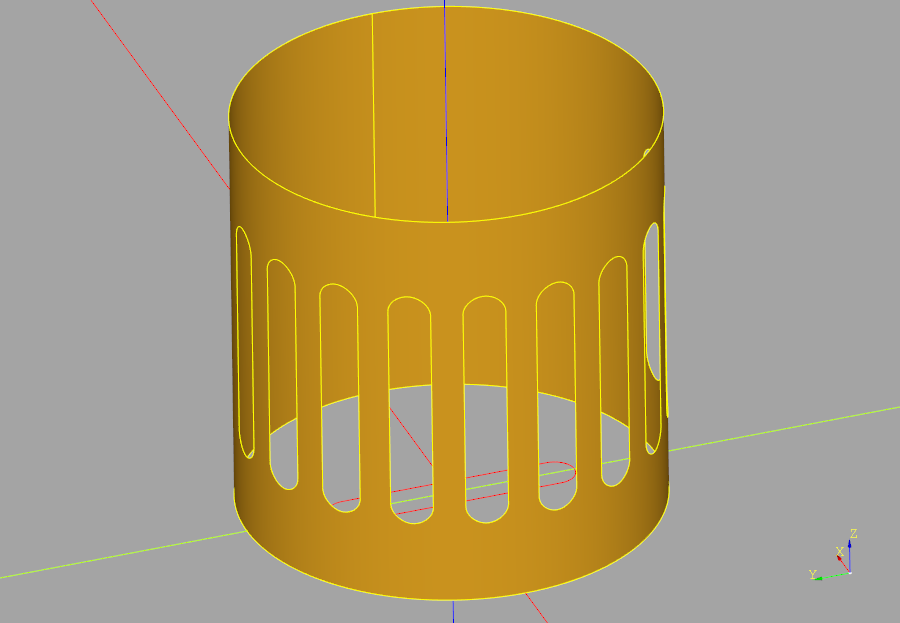
- パラメータ:
interior_wires -- a list of hole outline wires
interior_wires -- list[Wire]:
- 戻り値:
'self' with holes
- 戻り値の型:
- 例外:
RuntimeError -- adding interior hole in non-planar face with provided interior_wires
RuntimeError -- resulting face is not valid
- classmethod make_plane(plane: Plane = Plane((0, 0, 0), (1, 0, 0), (0, 0, 1))) Face[ソース]
Create a unlimited size Face aligned with plane
- classmethod make_rect(width: float, height: float, plane: Plane = Plane((0, 0, 0), (1, 0, 0), (0, 0, 1))) Face[ソース]
Make a Rectangle centered on center with the given normal
- classmethod make_surface(exterior: Wire | Iterable[Edge], surface_points: Iterable[Vector | tuple[float, float] | tuple[float, float, float] | Sequence[float]] | None = None, interior_wires: Iterable[Wire] | None = None) Face[ソース]
Create Non-Planar Face
Create a potentially non-planar face bounded by exterior (wire or edges), optionally refined by surface_points with optional holes defined by interior_wires.
- パラメータ:
- 例外:
RuntimeError -- Internal error building face
RuntimeError -- Error building non-planar face with provided surface_points
RuntimeError -- Error adding interior hole
RuntimeError -- Generated face is invalid
- 戻り値:
Potentially non-planar face
- 戻り値の型:
- classmethod make_surface_from_array_of_points(points: list[list[Vector | tuple[float, float] | tuple[float, float, float] | Sequence[float]]], tol: float = 0.01, smoothing: tuple[float, float, float] | None = None, min_deg: int = 1, max_deg: int = 3) Face[ソース]
Approximate a spline surface through the provided 2d array of points. The first dimension correspond to points on the vertical direction in the parameter space of the face. The second dimension correspond to points on the horizontal direction in the parameter space of the face. The 2 dimensions are U,V dimensions of the parameter space of the face.
- パラメータ:
points (list[list[VectorLike]]) -- a 2D list of points, first dimension is V parameters second is U parameters.
tol (float, optional) -- tolerance of the algorithm. Defaults to 1e-2.
smoothing (Tuple[float, float, float], optional) -- optional tuple of 3 weights use for variational smoothing. Defaults to None.
min_deg (int, optional) -- minimum spline degree. Enforced only when smoothing is None. Defaults to 1.
max_deg (int, optional) -- maximum spline degree. Defaults to 3.
- 例外:
ValueError -- B-spline approximation failed
- 戻り値:
a potentially non-planar face defined by points
- 戻り値の型:
- classmethod make_surface_from_curves(edge1: Edge, edge2: Edge) Face[ソース]
- classmethod make_surface_from_curves(wire1: Wire, wire2: Wire) Face
make_surface_from_curves
Create a ruled surface out of two edges or two wires. If wires are used then these must have the same number of edges.
- classmethod make_surface_patch(edge_face_constraints: Iterable[tuple[Edge, Face, ContinuityLevel]] | None = None, edge_constraints: Iterable[Edge] | None = None, point_constraints: Iterable[Vector | tuple[float, float] | tuple[float, float, float] | Sequence[float]] | None = None) Face[ソース]
Create a potentially non-planar face patch bounded by exterior edges which can be optionally refined using support faces to ensure e.g. tangent surface continuity. Also can optionally refine the surface using surface points.
- パラメータ:
edge_face_constraints (list[tuple[Edge, Face, ContinuityLevel]], optional) -- Edges defining perimeter of face with adjacent support faces subject to ContinuityLevel. Defaults to None.
edge_constraints (list[Edge], optional) -- Edges defining perimeter of face without adjacent support faces. Defaults to None.
point_constraints (list[VectorLike], optional) -- Points on the surface that refine the shape. Defaults to None.
- 例外:
RuntimeError -- Error building non-planar face with provided constraints
RuntimeError -- Generated face is invalid
- 戻り値:
Potentially non-planar face
- 戻り値の型:
- normal_at(surface_point: Vector | tuple[float, float] | tuple[float, float, float] | Sequence[float] | None = None) Vector[ソース]
- normal_at(u: float, v: float) Vector
normal_at
Computes the normal vector at the desired location on the face.
- パラメータ:
surface_point (VectorLike, optional) -- a point that lies on the surface where the normal. Defaults to None.
- 戻り値:
surface normal direction
- 戻り値の型:
- order = 2.0
- position_at(u: float, v: float) Vector[ソース]
Computes a point on the Face given u, v coordinates.
- パラメータ:
u (float) -- the horizontal coordinate in the parameter space of the Face, between 0.0 and 1.0
v (float) -- the vertical coordinate in the parameter space of the Face, between 0.0 and 1.0
- 戻り値:
point on Face
- 戻り値の型:
- project_to_shape(target_object: Shape, direction: Vector | tuple[float, float] | tuple[float, float, float] | Sequence[float]) ShapeList[Face | Shell][ソース]
Project Face to target Object
Project a Face onto a Shape generating new Face(s) on the surfaces of the object.
A projection with no taper is illustrated below:
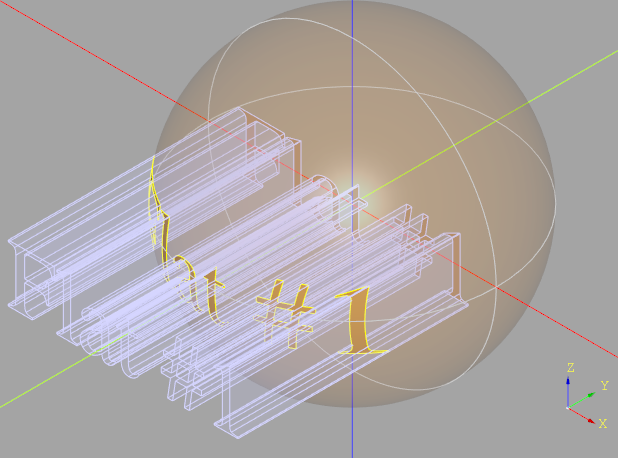
Note that an array of faces is returned as the projection might result in faces on the "front" and "back" of the object (or even more if there are intermediate surfaces in the projection path). faces "behind" the projection are not returned.
- property radii: None | tuple[float, float]
Return the major and minor radii of a torus otherwise None
- property radius: None | float
Return the radius of a cylinder or sphere, otherwise None
- classmethod revolve(profile: Edge, angle: float, axis: Axis) Face[ソース]
sweep
Revolve an Edge around an axis.
- property semi_angle: None | float
Return the semi angle of a cone, otherwise None
- classmethod sew_faces(faces: Iterable[Face]) list[ShapeList[Face]][ソース]
sew faces
Group contiguous faces and return them in a list of ShapeList
- classmethod sweep(profile: Curve | Edge | Wire, path: Curve | Edge | Wire, transition=<Transition.TRANSFORMED>) Face[ソース]
Sweep a 1D profile along a 1D path. Both the profile and path must be composed of only 1 Edge.
- パラメータ:
- 例外:
ValueError -- Only 1 Edge allowed in profile & path
- 戻り値:
resulting face, may be non-planar
- 戻り値の型:
- to_arcs(tolerance: float = 0.001) Face[ソース]
Approximate planar face with arcs and straight line segments.
This is a utility used internally to convert or adapt a face for Boolean operations. Its purpose is not typically for general use, but rather as a helper within the Boolean kernel to ensure input faces are in a compatible and canonical form.
- パラメータ:
tolerance (float, optional) -- Approximation tolerance. Defaults to 1e-3.
- 戻り値:
approximated face
- 戻り値の型:
- property uv_face: Face
Create a planar face from a face's parametric-space boundary.
Each boundary edge's pcurve on
selfis converted to a normal build123dEdgeon the XY plane, where X is the surface U parameter and Y is the surface V parameter. The original outer/inner wire structure is kept so the result can be displayed with normal build123d/ocp-vscode tooling.- パラメータ:
source_face -- Planar or non-planar face to inspect.
- 戻り値:
A planar
Facein UV parameter space.
- property volume: float
volume - the volume of this Face, which is always zero
- property width: None | float
width of planar face
- without_holes() Face[ソース]
Remove all of the holes from this face.
- 戻り値:
A new Face instance identical to the original but without any holes.
- 戻り値の型:
- wrap(planar_shape: Edge, surface_loc: Location, tolerance: float = 0.001, extension_factor: float = 0.1) Edge[ソース]
- wrap(planar_shape: Wire, surface_loc: Location, tolerance: float = 0.001, extension_factor: float = 0.1) Wire
- wrap(planar_shape: Face, surface_loc: Location, tolerance: float = 0.001, extension_factor: float = 0.1) Face
wrap
Wrap a planar 2D shape onto a 3D surface.
This method conforms a 2D shape defined on the XY plane (Edge, Wire, or Face) to the curvature of a non-planar 3D Face (the target surface), starting at a specified surface location. The operation attempts to preserve the original edge lengths and shape as closely as possible while minimizing the geometric distortion that naturally arises when mapping flat geometry onto curved surfaces.
The wrapping process follows the local orientation of the surface and progressively fits each edge along the curvature. To help ensure continuity, the first and last edges are extended and trimmed to close small gaps introduced by distortion. The final shape is tightly aligned to the surface geometry.
This method is useful for applying flat features—such as decorative patterns, cutouts, or boundary outlines—onto curved or freeform surfaces while retaining their original proportions.
- パラメータ:
planar_shape (Edge | Wire | Face) -- flat shape to wrap around surface
surface_loc (Location) -- location on surface to wrap
tolerance (float, optional) -- maximum allowed error. Defaults to 0.001
extension_factor (float, optional) -- amount to extend the wrapped first and last edges to allow them to cross. Defaults to 0.1
- 例外:
ValueError -- Invalid planar shape
- 戻り値:
wrapped shape
- 戻り値の型:
- wrap_faces(faces: Iterable[Face], path: Wire | Edge, start: float = 0.0) ShapeList[Face][ソース]
Wrap a sequence of 2D faces onto a 3D surface, aligned along a guiding path.
This method places multiple planar Face objects (defined in the XY plane) onto a curved 3D surface (self), following a given path (Wire or Edge) that lies on or closely follows the surface. Each face is spaced along the path according to its original horizontal (X-axis) position, preserving the relative layout of the input faces.
The wrapping process attempts to maintain the shape and size of each face while minimizing distortion. Each face is repositioned to the origin, then individually wrapped onto the surface starting at a specific point along the path. The face's new orientation is defined using the path's tangent direction and the surface normal at that point.
This is particularly useful for placing a series of features—such as embossed logos, engraved labels, or patterned tiles—onto a freeform or cylindrical surface, aligned along a reference edge or curve.
- パラメータ:
faces (Iterable[Face]) -- An iterable of 2D planar faces to be wrapped.
path (Wire | Edge) -- A curve on the target surface that defines the alignment direction. The X-position of each face is mapped to a relative position along this path.
start (float, optional) -- The relative starting point on the path (between 0.0 and 1.0) where the first face should be placed. Defaults to 0.0.
- 戻り値:
- A list of wrapped face objects, aligned and conformed to the
surface.
- 戻り値の型:
- class Mixin1D(obj: TopoDS_Shape | None = None, label: str = '', color: ColorLike | None = None, parent: Compound | None = None)[ソース]
Methods to add to the Edge and Wire classes
- classmethod cast(obj: TopoDS_Shape) Vertex | Edge | Wire[ソース]
Returns the right type of wrapper, given a OCCT object
- center(center_of: ~build123d.build_enums.CenterOf = <CenterOf.GEOMETRY>) Vector[ソース]
Center of object
Return the center based on center_of
- common_plane(*lines: Edge | Wire | None, tolerance: float = 1e-06) None | Plane[ソース]
Find the plane containing all the edges/wires (including self). If there is no common plane return None. If the edges are coaxial, select one of the infinite number of valid planes.
- curvature_comb(count: int = 100, max_tooth_size: float | None = None) ShapeList[Edge][ソース]
Build a curvature comb for a planar (XY) 1D curve.
A curvature comb is a set of short line segments (“teeth”) erected perpendicular to the curve that visualize the signed curvature κ(u). Tooth length is proportional to |κ| and the direction encodes the sign (left normal for κ>0, right normal for κ<0). This is useful for inspecting fairness and continuity (C0/C1/C2) of edges and wires.
- パラメータ:
count (int, optional) -- Number of uniformly spaced samples over the normalized parameter. Increase for a denser comb. Defaults to 100.
max_tooth_size (float | None, optional) -- Maximum tooth height in model units. If None, set to 10% maximum curve dimension. Defaults to None.
- 例外:
ValueError -- Empty curve.
ValueError -- If the curve is not planar on Plane.XY.
- 戻り値:
A list of short Edge objects (lines) anchored on the curve and oriented along the left normal n̂ = normalize(t) × +Z.
- 戻り値の型:
メモ
On circles, κ = 1/R so tooth length is constant.
On straight segments, κ = 0 so no teeth are drawn.
At inflection points κ→0 and the tooth flips direction.
At C0 corners the tangent is discontinuous; nearby teeth may jump. C1 yields continuous direction; C2 yields continuous magnitude as well.
サンプル
>>> comb = my_wire.curvature_comb(count=200, max_tooth_size=2.0)
>>> show(my_wire, Curve(comb))
- derivative_at(position: float | ~build123d.geometry.Vector | tuple[float, float] | tuple[float, float, float] | ~collections.abc.Sequence[float], order: int = 2, position_mode: ~build123d.build_enums.PositionMode = <PositionMode.PARAMETER>) Vector[ソース]
Derivative At
Generate a derivative along the underlying curve.
- パラメータ:
position (float | VectorLike) -- distance, parameter value or point
order (int) -- derivative order. Defaults to 2
position_mode (PositionMode, optional) -- position calculation mode. Defaults to PositionMode.PARAMETER.
- 例外:
ValueError -- position must be a float or a point
- 戻り値:
position on the underlying curve
- 戻り値の型:
- end_point() Vector[ソース]
The end point of this edge.
Note that circles may have identical start and end points.
- classmethod extrude(obj: Shape, direction: VectorLike) Edge | Face | Shell | Solid | Compound[ソース]
Unused - only here because Mixin1D is a subclass of Shape
- property is_closed: bool
Are the start and end points equal?
- property is_forward: bool
Does the Edge/Wire loop forward or reverse
- property is_interior: bool
Check if the edge is an interior edge.
An interior edge lies between surfaces that are part of the body (internal to the geometry) and does not form part of the exterior boundary.
- 戻り値:
True if the edge is an interior edge, False otherwise.
- 戻り値の型:
bool
- property length: float
Edge or Wire length
- location_at(distance: float, position_mode: ~build123d.build_enums.PositionMode = <PositionMode.PARAMETER>, frame_method: ~build123d.build_enums.FrameMethod = <FrameMethod.FRENET>, x_dir: ~build123d.geometry.Vector | tuple[float, float] | tuple[float, float, float] | ~collections.abc.Sequence[float] | None = None) Location[ソース]
Locations along curve
Generate a location along the underlying curve.
- パラメータ:
distance (float) -- distance or parameter value
position_mode (PositionMode, optional) -- position calculation mode. Defaults to PositionMode.PARAMETER.
frame_method (FrameMethod, optional) -- moving frame calculation method. The FRENET frame can “twist” or flip unexpectedly, especially near flat spots. The CORRECTED frame behaves more like a “camera dolly” or sweep profile would — it's smoother and more stable. Defaults to FrameMethod.FRENET.
x_dir (VectorLike, optional) -- override the x_dir to help with plane creation along a 1D shape. Must be perpendicular to shapes tangent. Defaults to None.
- 戻り値:
- A Location object representing local coordinate system
at the specified distance.
- 戻り値の型:
- locations(distances: ~collections.abc.Iterable[float], position_mode: ~build123d.build_enums.PositionMode = <PositionMode.PARAMETER>, frame_method: ~build123d.build_enums.FrameMethod = <FrameMethod.FRENET>, x_dir: ~build123d.geometry.Vector | tuple[float, float] | tuple[float, float, float] | ~collections.abc.Sequence[float] | None = None) list[Location][ソース]
Locations along curve
Generate location along the curve
- パラメータ:
distances (Iterable[float]) -- distance or parameter values
position_mode (PositionMode, optional) -- position calculation mode. Defaults to PositionMode.PARAMETER.
frame_method (FrameMethod, optional) -- moving frame calculation method. Defaults to FrameMethod.FRENET.
x_dir (VectorLike, optional) -- override the x_dir to help with plane creation along a 1D shape. Must be perpendicular to shapes tangent. Defaults to None.
- 戻り値:
- A list of Location objects representing local coordinate
systems at the specified distances.
- 戻り値の型:
list[Location]
- normal() Vector[ソース]
Calculate the normal Vector. Only possible for planar curves.
- 戻り値:
normal vector
Args:
Returns:
- offset_2d(distance: float, kind: ~build123d.build_enums.Kind = <Kind.ARC>, side: ~build123d.build_enums.Side = <Side.BOTH>, closed: bool = True) Edge | Wire[ソース]
2d Offset
Offsets a planar edge/wire
- パラメータ:
distance (float) -- distance from edge/wire to offset
kind (Kind, optional) -- offset corner transition. Defaults to Kind.ARC.
side (Side, optional) -- side to place offset. Defaults to Side.BOTH.
closed (bool, optional) -- if Side!=BOTH, close the LEFT or RIGHT offset. Defaults to True.
- 例外:
RuntimeError -- Multiple Wires generated
RuntimeError -- Unexpected result type
- 戻り値:
offset wire
- 戻り値の型:
- perpendicular_line(length: float, u_value: float, plane: Plane = Plane((0, 0, 0), (1, 0, 0), (0, 0, 1))) Edge[ソース]
Create a line on the given plane perpendicular to and centered on beginning of self
- position_at(position: float, position_mode: ~build123d.build_enums.PositionMode = <PositionMode.PARAMETER>) Vector[ソース]
Position At
Generate a position along the underlying Wire.
- パラメータ:
position (float) -- distance or parameter value
position_mode (PositionMode, optional) -- position calculation mode. Defaults to PositionMode.PARAMETER.
- 戻り値:
position on the underlying curve
- 戻り値の型:
- positions(distances: ~collections.abc.Iterable[float] | None = None, position_mode: ~build123d.build_enums.PositionMode = <PositionMode.PARAMETER>, deflection: float | None = None) list[Vector][ソース]
Positions along curve
Generate positions along the underlying curve
- パラメータ:
distances (Iterable[float] | None, optional) -- distance or parameter values. Defaults to None.
position_mode (PositionMode, optional) -- position calculation mode only applies when using distances. Defaults to PositionMode.PARAMETER.
deflection (float | None, optional) -- maximum deflection between the curve and the polygon that results from the computed points. Defaults to None.
- 戻り値:
positions along curve
- 戻り値の型:
list[Vector]
- project(face: Face, direction: VectorLike, closest: bool = True) Edge | Wire | ShapeList[Edge | Wire][ソース]
Project onto a face along the specified direction
- パラメータ:
face -- Face:
direction -- VectorLike:
closest -- bool: (Default value = True)
Returns:
- project_to_viewport(viewport_origin: Vector | tuple[float, float] | tuple[float, float, float] | Sequence[float], viewport_up: Vector | tuple[float, float] | tuple[float, float, float] | Sequence[float] = (0, 0, 1), look_at: Vector | tuple[float, float] | tuple[float, float, float] | Sequence[float] | None = None, focus: float | None = None) tuple[ShapeList[Edge], ShapeList[Edge]][ソース]
Project a shape onto a viewport returning visible and hidden Edges.
- パラメータ:
viewport_origin (VectorLike) -- location of viewport
viewport_up (VectorLike, optional) -- direction of the viewport y axis. Defaults to (0, 0, 1).
look_at (VectorLike, optional) -- point to look at. Defaults to None (center of shape).
focus (float, optional) -- the focal length for perspective projection Defaults to None (orthographic projection)
- 戻り値:
visible & hidden Edges
- 戻り値の型:
- property radius: float
Calculate the radius.
Note that when applied to a Wire, the radius is simply the radius of the first edge.
Args:
- 戻り値:
radius
- 例外:
ValueError -- if kernel can not reduce the shape to a circular edge
- start_point() Vector[ソース]
The start point of this edge
Note that circles may have identical start and end points.
- tangent_angle_at(location_param: float = 0.5, position_mode: ~build123d.build_enums.PositionMode = <PositionMode.PARAMETER>, plane: ~build123d.geometry.Plane = Plane((0, 0, 0), (1, 0, 0), (0, 0, 1))) float[ソース]
Compute the tangent angle at the specified location
- パラメータ:
location_param (float, optional) -- distance or parameter value. Defaults to 0.5.
position_mode (PositionMode, optional) -- position calculation mode. Defaults to PositionMode.PARAMETER.
plane (Plane, optional) -- plane line was constructed on. Defaults to Plane.XY.
- 戻り値:
angle in degrees between 0 and 360
- 戻り値の型:
float
- tangent_at(position: float | ~build123d.geometry.Vector | tuple[float, float] | tuple[float, float, float] | ~collections.abc.Sequence[float] = 0.5, position_mode: ~build123d.build_enums.PositionMode = <PositionMode.PARAMETER>) Vector[ソース]
Find the tangent at a given position on the 1D shape where the position is either a float (or int) parameter or a point that lies on the shape.
- パラメータ:
position (float | VectorLike) -- distance, parameter value, or point on shape. Defaults to 0.5.
position_mode (PositionMode, optional) -- position calculation mode. Defaults to PositionMode.PARAMETER.
- 戻り値:
tangent value
- 戻り値の型:
- property volume: float
volume - the volume of this Edge or Wire, which is always zero
- class Mixin2D(obj: TopoDS_Shape | None = None, label: str = '', color: ColorLike | None = None, parent: Compound | None = None)[ソース]
Additional methods to add to Face and Shell class
- classmethod cast(obj: TopoDS_Shape) Vertex | Edge | Wire | Face | Shell[ソース]
Returns the right type of wrapper, given a OCCT object
- classmethod extrude(obj: Shape, direction: VectorLike) Edge | Face | Shell | Solid | Compound[ソース]
Unused - only here because Mixin1D is a subclass of Shape
- find_intersection_points(other: Axis, tolerance: float = 1e-06) list[tuple[Vector, Vector]][ソース]
Find point and normal at intersection
Return both the point(s) and normal(s) of the intersection of the axis and the shape
- project_to_viewport(viewport_origin: Vector | tuple[float, float] | tuple[float, float, float] | Sequence[float], viewport_up: Vector | tuple[float, float] | tuple[float, float, float] | Sequence[float] = (0, 0, 1), look_at: Vector | tuple[float, float] | tuple[float, float, float] | Sequence[float] | None = None, focus: float | None = None) tuple[ShapeList[Edge], ShapeList[Edge]][ソース]
Project a shape onto a viewport returning visible and hidden Edges.
- パラメータ:
viewport_origin (VectorLike) -- location of viewport
viewport_up (VectorLike, optional) -- direction of the viewport y axis. Defaults to (0, 0, 1).
look_at (VectorLike, optional) -- point to look at. Defaults to None (center of shape).
focus (float, optional) -- the focal length for perspective projection Defaults to None (orthographic projection)
- 戻り値:
visible & hidden Edges
- 戻り値の型:
- split_by_perimeter(perimeter: Edge | Wire, keep: Literal[Keep.INSIDE, Keep.OUTSIDE]) Face | Shell | ShapeList[Face] | None[ソース]
- split_by_perimeter(perimeter: Edge | Wire, keep: Literal[Keep.BOTH]) tuple[Face | Shell | ShapeList[Face] | None, Face | Shell | ShapeList[Face] | None]
- split_by_perimeter(perimeter: Edge | Wire, keep: Literal[Keep.INSIDE] = Keep.INSIDE) Face | Shell | ShapeList[Face] | None
split_by_perimeter
Divide the faces of this object into those within the perimeter and those outside the perimeter.
Note: this method may fail if the perimeter intersects shape edges.
- パラメータ:
- 例外:
ValueError -- perimeter must be closed
ValueError -- keep must be one of Keep.INSIDE|OUTSIDE|BOTH
- 戻り値:
Union[Face | Shell | ShapeList[Face] | None, Tuple[Face | Shell | ShapeList[Face] | None]: The result of the split operation.
Keep.INSIDE: Returns the inside part as a Shell or Face, or None if no inside part is found.
Keep.OUTSIDE: Returns the outside part as a Shell or Face, or None if no outside part is found.
Keep.BOTH: Returns a tuple (inside, outside) where each element is either a Shell, Face, or None if no corresponding part is found.
- touch(other: Shape, tolerance: float = 1e-06, found_faces: ShapeList | None = None, found_edges: ShapeList | None = None) ShapeList[ソース]
Find boundary contacts between this 2D shape and another shape.
Returns the highest-dimensional contact at each location, filtered to avoid returning lower-dimensional boundaries of higher-dimensional contacts.
For Face/Shell: - Face + Face → Vertex (shared corner or crossing point without edge/face overlap) - Face + Edge/Vertex → no touch (intersect already returns dim 0)
- パラメータ:
other -- Shape to find contacts with
tolerance -- tolerance for contact detection
found_faces -- pre-found faces to filter against (from Mixin3D.touch)
found_edges -- pre-found edges to filter against (from Mixin3D.touch)
- 戻り値:
ShapeList of contact shapes (Vertex only for 2D+2D)
- class Mixin3D(obj: TopoDS_Shape | None = None, label: str = '', color: ColorLike | None = None, parent: Compound | None = None)[ソース]
Additional methods to add to 3D Shape classes
- classmethod cast(obj: TopoDS_Shape) Self[ソース]
Returns the right type of wrapper, given a OCCT object
- center(center_of: ~build123d.build_enums.CenterOf = <CenterOf.MASS>) Vector[ソース]
Return center of object
Find center of object
- chamfer(length: float, length2: float | None, edge_list: Iterable[Edge], face: Face | None = None) Solid | Part[ソース]
Chamfer
Chamfers the specified edges of this solid.
- パラメータ:
length (float) -- length > 0, the length (length) of the chamfer
length2 (Optional[float]) -- length2 > 0, optional parameter for asymmetrical chamfer. Should be None if not required.
edge_list (Iterable[Edge]) -- a list of Edge objects, which must belong to this solid
face (Face, optional) -- identifies the side where length is measured. The edge(s) must be part of the face
- 戻り値:
Chamfered solid or 3D composite
- 戻り値の型:
- dprism(basis: Face | None, bounds: list[Face | Wire], depth: float | None = None, taper: float = 0, up_to_face: Face | None = None, thru_all: bool = True, additive: bool = True) Solid[ソース]
Make a prismatic feature (additive or subtractive)
- パラメータ:
basis (Optional[Face]) -- face to perform the operation on
depth (float, optional) -- depth of the cut or extrusion. Defaults to None.
taper (float, optional) -- in degrees. Defaults to 0.
up_to_face (Face, optional) -- a face to extrude until. Defaults to None.
thru_all (bool, optional) -- cut thru_all. Defaults to True.
additive (bool, optional) -- Defaults to True.
- 戻り値:
prismatic feature
- 戻り値の型:
- classmethod extrude(obj: Shape, direction: VectorLike) Edge | Face | Shell | Solid | Compound[ソース]
Unused - only here because Mixin1D is a subclass of Shape
- fillet(radius: float, edge_list: Iterable[Edge]) Solid | Part[ソース]
Fillet
Fillets the specified edges of this solid.
- find_intersection_points(other: Axis, tolerance: float = 1e-06) list[tuple[Vector, Vector]]
Find point and normal at intersection
Return both the point(s) and normal(s) of the intersection of the axis and the shape
- hollow(faces: ~collections.abc.Iterable[~topology.two_d.Face] | None, thickness: float, tolerance: float = 0.0001, kind: ~build123d.build_enums.Kind = <Kind.ARC>) Solid[ソース]
Hollow
Return the outer shelled solid of self.
- パラメータ:
faces (Optional[Iterable[Face]]) -- faces to be removed,
list. (which must be part of the solid. Can be an empty)
thickness (float) -- shell thickness - positive shells outwards, negative shells inwards.
tolerance (float, optional) -- modelling tolerance of the method. Defaults to 0.0001.
kind (Kind, optional) -- intersection type. Defaults to Kind.ARC.
- 例外:
ValueError -- Kind.TANGENT not supported
- 戻り値:
A hollow solid.
- 戻り値の型:
- is_inside(point: Vector | tuple[float, float] | tuple[float, float, float] | Sequence[float], tolerance: float = 1e-06) bool[ソース]
Returns whether or not the point is inside a solid or compound object within the specified tolerance.
- パラメータ:
point -- tuple or Vector representing 3D point to be tested
tolerance -- tolerance for inside determination, default=1.0e-6
point -- VectorLike:
tolerance -- float: (Default value = 1.0e-6)
- 戻り値:
bool indicating whether or not point is within solid
- max_fillet(edge_list: Iterable[Edge], tolerance=0.1, max_iterations: int = 10) float[ソース]
Find Maximum Fillet Size
Find the largest fillet radius for the given Shape and edges with a recursive binary search.
サンプル
max_fillet_radius = my_shape.max_fillet(shape_edges) max_fillet_radius = my_shape.max_fillet(shape_edges, tolerance=0.5, max_iterations=8)
- パラメータ:
edge_list (Iterable[Edge]) -- a sequence of Edge objects, which must belong to this solid
tolerance (float, optional) -- maximum error from actual value. Defaults to 0.1.
max_iterations (int, optional) -- maximum number of recursive iterations. Defaults to 10.
- 例外:
RuntimeError -- failed to find the max value
ValueError -- the provided Shape is invalid
- 戻り値:
maximum fillet radius
- 戻り値の型:
float
- offset_3d(openings: ~collections.abc.Iterable[~topology.two_d.Face] | None, thickness: float, tolerance: float = 0.0001, kind: ~build123d.build_enums.Kind = <Kind.ARC>) Solid[ソース]
Shell
Make an offset solid of self.
- パラメータ:
openings (Optional[Iterable[Face]]) -- faces to be removed, which must be part of the solid. Can be an empty list.
thickness (float) -- offset amount - positive offset outwards, negative inwards
tolerance (float, optional) -- modelling tolerance of the method. Defaults to 0.0001.
kind (Kind, optional) -- intersection type. Defaults to Kind.ARC.
- 例外:
ValueError -- Kind.TANGENT not supported
- 戻り値:
A shelled solid.
- 戻り値の型:
- project_to_viewport(viewport_origin: Vector | tuple[float, float] | tuple[float, float, float] | Sequence[float], viewport_up: Vector | tuple[float, float] | tuple[float, float, float] | Sequence[float] = (0, 0, 1), look_at: Vector | tuple[float, float] | tuple[float, float, float] | Sequence[float] | None = None, focus: float | None = None) tuple[ShapeList[Edge], ShapeList[Edge]][ソース]
Project a shape onto a viewport returning visible and hidden Edges.
- パラメータ:
viewport_origin (VectorLike) -- location of viewport
viewport_up (VectorLike, optional) -- direction of the viewport y axis. Defaults to (0, 0, 1).
look_at (VectorLike, optional) -- point to look at. Defaults to None (center of shape).
focus (float, optional) -- the focal length for perspective projection Defaults to None (orthographic projection)
- 戻り値:
visible & hidden Edges
- 戻り値の型:
- class Shape(obj: TopoDS_Shape | None = None, label: str = '', color: ColorLike | None = None, parent: Compound | None = None)[ソース]
Base class for all CAD objects such as Edge, Face, Solid, etc.
- パラメータ:
obj (TopoDS_Shape, optional) -- OCCT object. Defaults to None.
label (str, optional) -- Defaults to ''.
color (ColorLike, optional) -- Defaults to None.
parent (Compound, optional) -- assembly parent. Defaults to None.
- 変数:
wrapped (TopoDS_Shape) -- the OCP object
label (str) -- user assigned label
color (Color) -- object color
(dict[str (joints) -- Joint]): dictionary of joints bound to this object (Solid only)
children (Shape) -- list of assembly children of this object (Compound only)
topo_parent (Shape) -- assembly parent of this object
- __add__(other: None) Self[ソース]
- __add__(other: Shape | Iterable[Shape]) Self | Compound
fuse shape to self operator +
- __and__(other: Shape | Iterable[Shape]) None | Self | Compound[ソース]
intersect shape with self operator &
- __copy__() Self[ソース]
Return shallow copy or reference of self
Create an copy of this Shape that shares the underlying TopoDS_TShape.
Used when there is a need for many objects with the same CAD structure but at different Locations, etc. - for examples fasteners in a larger assembly. By sharing the TopoDS_TShape, the memory size of such assemblies can be greatly reduced.
Changes to the CAD structure of the base object will be reflected in all instances.
- __eq__(other) bool[ソース]
Check if two shapes are the same.
This method checks if the current shape is the same as the other shape. Two shapes are considered the same if they share the same TShape with the same Locations. Orientations may differ.
- パラメータ:
other (Shape) -- The shape to compare with.
- 戻り値:
True if the shapes are the same, False otherwise.
- 戻り値の型:
bool
- __rmul__(other: Plane | Location) Self[ソース]
- __rmul__(other: Iterable[Plane | Location]) list[Self]
right multiply for positioning operator *
- __sub__(other: None) Self[ソース]
- __sub__(other: Shape | Iterable[Shape]) Self | Compound
cut shape from self operator -
- property area: float
area -the surface area of all faces in this Shape
- bounding_box(tolerance: float | None = None, optimal: bool = True) BoundBox[ソース]
Create a bounding box for this Shape.
- パラメータ:
tolerance (float, optional) -- Defaults to None.
- 戻り値:
A box sized to contain this Shape
- 戻り値の型:
- abstract classmethod cast(obj: TopoDS_Shape) Self[ソース]
Returns the right type of wrapper, given a OCCT object
- clean() Self[ソース]
Remove internal edges
- 戻り値:
Original object with extraneous internal edges removed
- 戻り値の型:
- closest_points(other: Shape | Vector | tuple[float, float] | tuple[float, float, float] | Sequence[float]) tuple[Vector, Vector][ソース]
Points on two shapes where the distance between them is minimal
- property color: None | Color
Get the shape's color. If it's None, get the color of the nearest ancestor, assign it to this Shape and return this value.
- static combined_center(objects: ~collections.abc.Iterable[~topology.shape_core.Shape], center_of: ~build123d.build_enums.CenterOf = <CenterOf.MASS>) Vector[ソース]
combined center
Calculates the center of a multiple objects.
- composite_factories: ClassVar[dict[int | None, Callable[[Iterable[Shape]], Shape]]] = {1: <class 'topology.composite.Curve'>, 2: <class 'topology.composite.Sketch'>, 3: <class 'topology.composite.Part'>, None: <class 'topology.composite.Compound'>}
- static compute_mass(obj: Shape) float[ソース]
Calculates the 'mass' of an object.
- パラメータ:
obj -- Compute the mass of this object
obj -- Shape:
Returns:
- copy_attributes_to(target: Shape, exceptions: Iterable[str] | None = None)[ソース]
Copy common object attributes to target
Note that preset attributes of target will not be overridden.
- パラメータ:
target (Shape) -- object to gain attributes
exceptions (Iterable[str], optional) -- attributes not to copy
- 例外:
ValueError -- invalid attribute
- cut(*to_cut: Shape) Self | Compound[ソース]
Remove the positional arguments from this Shape.
- パラメータ:
*to_cut -- Shape:
- 戻り値:
Resulting object may be of a different class than self
- 戻り値の型:
Self | Compound
- distance(other: Shape) float[ソース]
Minimal distance between two shapes
- パラメータ:
other -- Shape:
Returns:
- distance_to(other: Shape | Vector | tuple[float, float] | tuple[float, float, float] | Sequence[float]) float[ソース]
Minimal distance between two shapes
- distance_to_with_closest_points(other: Shape | Vector | tuple[float, float] | tuple[float, float, float] | Sequence[float]) tuple[float, Vector, Vector][ソース]
Minimal distance between two shapes and the points on each shape
- distances(*others: Shape) Iterator[float][ソース]
Minimal distances to between self and other shapes
- パラメータ:
*others -- Shape:
Returns:
- downcast_LUT = {<TopAbs_ShapeEnum.TopAbs_COMPOUND: 0>: <built-in method Compound of PyCapsule object>, <TopAbs_ShapeEnum.TopAbs_COMPSOLID: 1>: <built-in method CompSolid of PyCapsule object>, <TopAbs_ShapeEnum.TopAbs_EDGE: 6>: <built-in method Edge of PyCapsule object>, <TopAbs_ShapeEnum.TopAbs_FACE: 4>: <built-in method Face of PyCapsule object>, <TopAbs_ShapeEnum.TopAbs_SHELL: 3>: <built-in method Shell of PyCapsule object>, <TopAbs_ShapeEnum.TopAbs_SOLID: 2>: <built-in method Solid of PyCapsule object>, <TopAbs_ShapeEnum.TopAbs_VERTEX: 7>: <built-in method Vertex of PyCapsule object>, <TopAbs_ShapeEnum.TopAbs_WIRE: 5>: <built-in method Wire of PyCapsule object>}
- entities(topo_type: Literal['Vertex', 'Edge', 'Wire', 'Face', 'Shell', 'Solid', 'Compound']) list[TopoDS_Shape][ソース]
Return all of the TopoDS sub entities of the given type
- abstract classmethod extrude(obj: Shape, direction: VectorLike) Edge | Face | Shell | Solid | Compound[ソース]
Extrude a Shape in the provided direction. * Vertices generate Edges * Edges generate Faces * Wires generate Shells * Faces generate Solids * Shells generate Compounds
- faces_intersected_by_axis(axis: Axis, tol: float = 0.0001) ShapeList[Face][ソース]
Line Intersection
Computes the intersections between the provided axis and the faces of this Shape
- fuse(*to_fuse: Shape, glue: bool = False, tol: float | None = None) Self | Compound[ソース]
Fuse a sequence of shapes into a single shape.
- パラメータ:
to_fuse (sequence Shape) -- shapes to fuse
glue (bool, optional) -- performance improvement for some shapes. Defaults to False.
tol (float, optional) -- tolerance. Defaults to None.
- 戻り値:
Resulting object may be of a different class than self
- 戻り値の型:
Self | Compound
- geom_LUT_EDGE: dict[GeomAbs_CurveType, GeomType] = {<GeomAbs_CurveType.GeomAbs_BSplineCurve: 6>: <GeomType.BSPLINE>, <GeomAbs_CurveType.GeomAbs_BezierCurve: 5>: <GeomType.BEZIER>, <GeomAbs_CurveType.GeomAbs_Circle: 1>: <GeomType.CIRCLE>, <GeomAbs_CurveType.GeomAbs_Ellipse: 2>: <GeomType.ELLIPSE>, <GeomAbs_CurveType.GeomAbs_Hyperbola: 3>: <GeomType.HYPERBOLA>, <GeomAbs_CurveType.GeomAbs_Line: 0>: <GeomType.LINE>, <GeomAbs_CurveType.GeomAbs_OffsetCurve: 7>: <GeomType.OFFSET>, <GeomAbs_CurveType.GeomAbs_OtherCurve: 8>: <GeomType.OTHER>, <GeomAbs_CurveType.GeomAbs_Parabola: 4>: <GeomType.PARABOLA>}
- geom_LUT_FACE: dict[GeomAbs_SurfaceType, GeomType] = {<GeomAbs_SurfaceType.GeomAbs_BSplineSurface: 6>: <GeomType.BSPLINE>, <GeomAbs_SurfaceType.GeomAbs_BezierSurface: 5>: <GeomType.BEZIER>, <GeomAbs_SurfaceType.GeomAbs_Cone: 2>: <GeomType.CONE>, <GeomAbs_SurfaceType.GeomAbs_Cylinder: 1>: <GeomType.CYLINDER>, <GeomAbs_SurfaceType.GeomAbs_OffsetSurface: 9>: <GeomType.OFFSET>, <GeomAbs_SurfaceType.GeomAbs_OtherSurface: 10>: <GeomType.OTHER>, <GeomAbs_SurfaceType.GeomAbs_Plane: 0>: <GeomType.PLANE>, <GeomAbs_SurfaceType.GeomAbs_Sphere: 3>: <GeomType.SPHERE>, <GeomAbs_SurfaceType.GeomAbs_SurfaceOfExtrusion: 8>: <GeomType.EXTRUSION>, <GeomAbs_SurfaceType.GeomAbs_SurfaceOfRevolution: 7>: <GeomType.REVOLUTION>, <GeomAbs_SurfaceType.GeomAbs_Torus: 4>: <GeomType.TORUS>}
- property geom_type: GeomType
Gets the underlying geometry type.
- 戻り値:
The geometry type of the shape
- 戻り値の型:
- static get_shape_list(shape: Shape, entity_type: Literal['Vertex']) ShapeList[Vertex][ソース]
- static get_shape_list(shape: Shape, entity_type: Literal['Edge']) ShapeList[Edge]
- static get_shape_list(shape: Shape, entity_type: Literal['Wire']) ShapeList[Wire]
- static get_shape_list(shape: Shape, entity_type: Literal['Face']) ShapeList[Face]
- static get_shape_list(shape: Shape, entity_type: Literal['Shell']) ShapeList[Shell]
- static get_shape_list(shape: Shape, entity_type: Literal['Solid']) ShapeList[Solid]
- static get_shape_list(shape: Shape, entity_type: Literal['Compound']) ShapeList[Compound]
Helper to extract entities of a specific type from a shape.
- static get_single_shape(shape: Shape, entity_type: Literal['Vertex']) Vertex[ソース]
- static get_single_shape(shape: Shape, entity_type: Literal['Edge']) Edge
- static get_single_shape(shape: Shape, entity_type: Literal['Wire']) Wire
- static get_single_shape(shape: Shape, entity_type: Literal['Face']) Face
- static get_single_shape(shape: Shape, entity_type: Literal['Shell']) Shell
- static get_single_shape(shape: Shape, entity_type: Literal['Solid']) Solid
- static get_single_shape(shape: Shape, entity_type: Literal['Compound']) Compound
Return the single entity of the requested type.
- 例外:
ValueError -- if the number of matching entities is not exactly one.
- get_top_level_shapes() ShapeList[Shape][ソース]
Retrieve the first level of child shapes from the shape.
This method collects all the non-compound shapes directly contained in the current shape. If the wrapped shape is a TopoDS_Compound, it traverses its immediate children and collects all shapes that are not further nested compounds. Nested compounds are traversed to gather their non-compound elements without returning the nested compound itself.
サンプル
If the current shape is a compound containing both simple shapes (e.g., edges, vertices) and other compounds, the method returns a list of only the simple shapes directly contained at the top level.
- property global_location: Location
The location of this Shape relative to the global coordinate system.
This property computes the composite transformation by traversing the hierarchy from the root of the assembly to this node, combining the location of each ancestor. It reflects the absolute position and orientation of the shape in world space, even when the shape is deeply nested within an assembly.
注釈
This is only meaningful when the Shape is part of an assembly tree where parent-child relationships define relative placements.
- intersect(*to_intersect: Shape | Vector | Location | Axis | Plane, tolerance: float = 1e-06, include_touched: bool = False) ShapeList | None[ソース]
Find where bodies/interiors meet (overlap or crossing geometry).
This is the main entry point for intersection operations. Handles geometry conversion and delegates to subclass _intersect() implementations.
- Semantics:
Multiple arguments use AND (chaining): c.intersect(s1, s2) = c ∩ s1 ∩ s2
Compound arguments use OR (distribution): c.intersect(Compound([s1, s2])) = (c ∩ s1) ∪ (c ∩ s2)
- パラメータ:
to_intersect -- Shape(s) or geometry objects to intersect with
tolerance -- tolerance for intersection detection
include_touched -- if True, include boundary contacts without interior overlap (only relevant when Solids are involved)
- 戻り値:
ShapeList of intersection results, or None if no intersection
- inverse_shape_LUT = {'CompSolid': <TopAbs_ShapeEnum.TopAbs_COMPSOLID: 1>, 'Compound': <TopAbs_ShapeEnum.TopAbs_COMPOUND: 0>, 'Edge': <TopAbs_ShapeEnum.TopAbs_EDGE: 6>, 'Face': <TopAbs_ShapeEnum.TopAbs_FACE: 4>, 'Shell': <TopAbs_ShapeEnum.TopAbs_SHELL: 3>, 'Solid': <TopAbs_ShapeEnum.TopAbs_SOLID: 2>, 'Vertex': <TopAbs_ShapeEnum.TopAbs_VERTEX: 7>, 'Wire': <TopAbs_ShapeEnum.TopAbs_WIRE: 5>}
- is_equal(other: Shape) bool[ソース]
Returns True if two shapes are equal, i.e. if they share the same TShape with the same Locations and Orientations. Also see
is_same().- パラメータ:
other -- Shape:
Returns:
- property is_manifold: bool
Check if each edge in the given Shape has exactly two faces associated with it (skipping degenerate edges). If so, the shape is manifold.
- 戻り値:
is the shape manifold or water tight
- 戻り値の型:
bool
- property is_null: bool
Returns true if this shape is null. In other words, it references no underlying shape with the potential to be given a location and an orientation.
- property is_planar_face: bool
Is the shape a planar face even though its geom_type may not be PLANE
- is_same(other: Shape) bool[ソース]
Returns True if other and this shape are same, i.e. if they share the same TShape with the same Locations. Orientations may differ. Also see
is_equal()- パラメータ:
other -- Shape:
Returns:
- property is_valid: bool
Returns True if no defect is detected on the shape S or any of its subshapes. See the OCCT docs on BRepCheck_Analyzer::IsValid for a full description of what is checked.
- locate(loc: Location) Self[ソース]
Apply a location in absolute sense to self
- パラメータ:
loc -- Location:
Returns:
- property location: Location
Get this Shape's Location
- classmethod make_composite(shapes: Iterable[Shape], dimension: int | None = None) Shape[ソース]
Build the registered composite for a dimension.
- property matrix_of_inertia: list[list[float]]
Compute the inertia matrix (moment of inertia tensor) of the shape.
The inertia matrix represents how the mass of the shape is distributed with respect to its reference frame. It is a 3×3 symmetric tensor that describes the resistance of the shape to rotational motion around different axes.
- 戻り値:
A 3×3 nested list representing the inertia matrix. The elements of the matrix are given as:
Ixx Ixy Ixz |Ixy Iyy Iyz |Ixz Iyz Izz |where: - Ixx, Iyy, Izz are the moments of inertia about the X, Y, and Z axes. - Ixy, Ixz, Iyz are the products of inertia.
- 戻り値の型:
list[list[float]]
サンプル
>>> obj = MyShape()
>>> obj.matrix_of_inertia
[[1000.0, 50.0, 0.0],
[50.0, 1200.0, 0.0],
[0.0, 0.0, 300.0]]
メモ
The inertia matrix is computed relative to the shape's center of mass.
It is commonly used in structural analysis, mechanical simulations, and physics-based motion calculations.
- mesh(tolerance: float, angular_tolerance: float = 0.1)[ソース]
Generate triangulation if none exists.
- パラメータ:
tolerance -- float:
angular_tolerance -- float: (Default value = 0.1)
Returns:
- mirror(mirror_plane: Plane | None = None) Self[ソース]
Applies a mirror transform to this Shape. Does not duplicate objects about the plane.
- パラメータ:
mirror_plane (Plane) -- The plane to mirror about. Defaults to Plane.XY
- 戻り値:
The mirrored shape
- move(loc: Location) Self[ソース]
Apply a location in relative sense (i.e. update current location) to self
- パラメータ:
loc -- Location:
Returns:
- moved(loc: Location | Plane) Self[ソース]
Apply a location in relative sense (i.e. update current location) to a copy of self
- property orientation: Vector
Get the orientation component of this Shape's Location
- oriented_bounding_box() OrientedBoundBox[ソース]
Create an oriented bounding box for this Shape.
- 戻り値:
A box oriented and sized to contain this Shape
- 戻り値の型:
OrientedBoundBox
- property position: Vector
Get the position component of this Shape's Location
- property principal_properties: list[tuple[Vector, float]]
Compute the principal moments of inertia and their corresponding axes.
- 戻り値:
A list of tuples, where each tuple contains: - A Vector representing the axis of inertia. - A float representing the moment of inertia for that axis.
- 戻り値の型:
list[tuple[Vector, float]]
サンプル
>>> obj = MyShape()
>>> obj.principal_properties
[(Vector(1, 0, 0), 1200.0),
(Vector(0, 1, 0), 1000.0),
(Vector(0, 0, 1), 300.0)]
- project_faces(faces: list[Face] | Compound, path: Wire | Edge, start: float = 0) ShapeList[Face][ソース]
Projected Faces following the given path on Shape
Project by positioning each face of to the shape along the path and projecting onto the surface.
Note that projection may result in distortion depending on the shape at a position along the path.
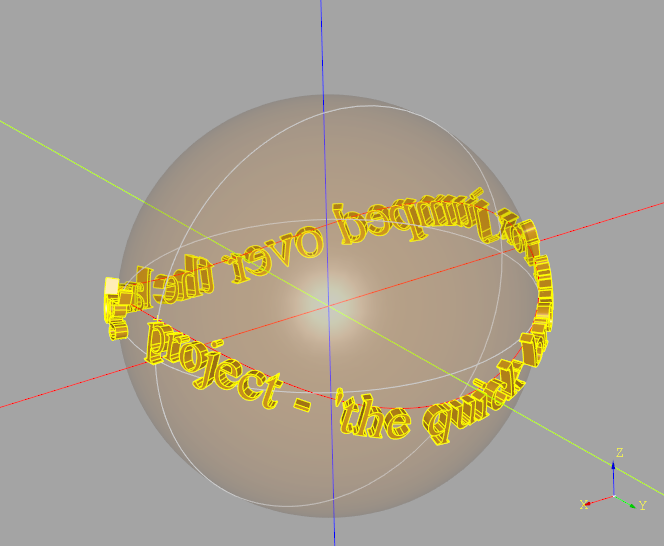
- radius_of_gyration(axis: Axis) float[ソース]
Compute the radius of gyration of the shape about a given axis.
The radius of gyration represents the distance from the axis at which the entire mass of the shape could be concentrated without changing its moment of inertia. It provides insight into how mass is distributed relative to the axis and is useful in structural analysis, rotational dynamics, and mechanical simulations.
- パラメータ:
axis (Axis) -- The axis about which the radius of gyration is computed. The axis should be defined in the same coordinate system as the shape.
- 戻り値:
The radius of gyration in the same units as the shape's dimensions.
- 戻り値の型:
float
サンプル
>>> obj = MyShape()
>>> axis = Axis((0, 0, 0), (0, 0, 1))
>>> obj.radius_of_gyration(axis)
5.47
メモ
The radius of gyration is computed based on the shape’s mass properties.
It is useful for evaluating structural stability and rotational behavior.
- classmethod register_composite_factory(dimension: int | None, factory: Callable[[Iterable[Shape]], Shape]) None[ソース]
Register a composite constructor without importing it here.
- relocate(loc: Location)[ソース]
Change the location of self while keeping it geometrically similar
- パラメータ:
loc (Location) -- new location to set for self
- rotate(axis: Axis, angle: float, transform: bool = False) Self[ソース]
rotate a copy
Rotates a shape around an axis.
- パラメータ:
axis (Axis) -- rotation Axis
angle (float) -- angle to rotate, in degrees
transform (bool) -- regenerate the shape instead of just changing its location. Defaults to False.
- 戻り値:
a copy of the shape, rotated
- scale(factor: float | tuple[float, float, float], about: Vector | tuple[float, float] | tuple[float, float, float] | Sequence[float] | None = None) Self[ソース]
Scale this shape about a point.
Non-uniform scaling may change the underlying geometry type to splines. When
aboutisn't provided, the shape is scaled about its location.- パラメータ:
factor (float | tuple[float, float, float]) -- uniform scale factor or three scale factors for the X, Y and Z directions.
about (VectorLike, optional) -- point to scale about. Defaults to the shape's location position.
- 戻り値:
a copy of the scaled shape.
- 戻り値の型:
- shape_LUT = {<TopAbs_ShapeEnum.TopAbs_COMPOUND: 0>: 'Compound', <TopAbs_ShapeEnum.TopAbs_COMPSOLID: 1>: 'CompSolid', <TopAbs_ShapeEnum.TopAbs_EDGE: 6>: 'Edge', <TopAbs_ShapeEnum.TopAbs_FACE: 4>: 'Face', <TopAbs_ShapeEnum.TopAbs_SHELL: 3>: 'Shell', <TopAbs_ShapeEnum.TopAbs_SOLID: 2>: 'Solid', <TopAbs_ShapeEnum.TopAbs_VERTEX: 7>: 'Vertex', <TopAbs_ShapeEnum.TopAbs_WIRE: 5>: 'Wire'}
- shape_properties_LUT: dict[TopAbs_ShapeEnum, Callable[[TopoDS_Shape, GProp_GProps], None] | None] = {<TopAbs_ShapeEnum.TopAbs_COMPOUND: 0>: <built-in method VolumeProperties_s of PyCapsule object>, <TopAbs_ShapeEnum.TopAbs_COMPSOLID: 1>: <built-in method VolumeProperties_s of PyCapsule object>, <TopAbs_ShapeEnum.TopAbs_EDGE: 6>: <built-in method LinearProperties_s of PyCapsule object>, <TopAbs_ShapeEnum.TopAbs_FACE: 4>: <built-in method SurfaceProperties_s of PyCapsule object>, <TopAbs_ShapeEnum.TopAbs_SHELL: 3>: <built-in method SurfaceProperties_s of PyCapsule object>, <TopAbs_ShapeEnum.TopAbs_SOLID: 2>: <built-in method VolumeProperties_s of PyCapsule object>, <TopAbs_ShapeEnum.TopAbs_VERTEX: 7>: None, <TopAbs_ShapeEnum.TopAbs_WIRE: 5>: <built-in method LinearProperties_s of PyCapsule object>}
- property shape_type: Literal['Vertex', 'Edge', 'Wire', 'Face', 'Shell', 'Solid', 'Compound']
Return the shape type string for this class
- show_topology(limit_class: Literal['Compound', 'Edge', 'Face', 'Shell', 'Solid', 'Vertex', 'Wire'] = 'Vertex', show_center: bool | None = None) str[ソース]
Display internal topology
Display the internal structure of a Compound 'assembly' or Shape. Example:
>>> c1.show_topology()

c1 is the root         Compound at 0x7f4a4cafafa0, Location(...))
├──                    Solid    at 0x7f4a4cafafd0, Location(...))
├── c2 is 1st compound Compound at 0x7f4a4cafaee0, Location(...))
│   ├──                Solid    at 0x7f4a4cafad00, Location(...))
│   └──                Solid    at 0x7f4a11a52790, Location(...))
└── c3 is 2nd          Compound at 0x7f4a4cafad60, Location(...))
    ├──                Solid    at 0x7f4a11a52700, Location(...))
    └──                Solid    at 0x7f4a11a58550, Location(...))
- パラメータ:
limit_class -- type of displayed leaf node. Defaults to 'Vertex'.
show_center (bool, optional) -- If None, shows the Location of Compound 'assemblies' and the bounding box center of Shapes. True or False forces the display. Defaults to None.
- 戻り値:
tree representation of internal structure
- 戻り値の型:
str
- split(tool: TrimmingTool, keep: Literal[Keep.TOP, Keep.BOTTOM]) Self | list[Self] | None[ソース]
- split(tool: TrimmingTool, keep: Literal[Keep.ALL]) list[Self]
- split(tool: TrimmingTool, keep: Literal[Keep.BOTH]) tuple[Self | list[Self] | None, Self | list[Self] | None]
- split(tool: TrimmingTool, keep: Literal[Keep.INSIDE, Keep.OUTSIDE]) None
- split(tool: TrimmingTool) Self | list[Self] | None
split
Split this shape by the provided plane or face.
- パラメータ:
- 戻り値:
result of split
- 戻り値の型:
- 戻り値:
Self | list[Self] | None, Tuple[Self | list[Self] | None]: The result of the split operation.
Keep.TOP: Returns the top as a Self or list[Self], or None if no top is found.
Keep.BOTTOM: Returns the bottom as a Self or list[Self], or None if no bottom is found.
Keep.BOTH: Returns a tuple (inside, outside) where each element is either a Self or list[Self], or None if no corresponding part is found.
- split_by_perimeter(perimeter: Edge | Wire, keep: Literal[Keep.INSIDE, Keep.OUTSIDE]) Face | Shell | ShapeList[Face] | None[ソース]
- split_by_perimeter(perimeter: Edge | Wire, keep: Literal[Keep.BOTH]) tuple[Face | Shell | ShapeList[Face] | None, Face | Shell | ShapeList[Face] | None]
- split_by_perimeter(perimeter: Edge | Wire, keep: Literal[Keep.INSIDE] = Keep.INSIDE) Face | Shell | ShapeList[Face] | None
split_by_perimeter
Divide the faces of this object into those within the perimeter and those outside the perimeter.
Note: this method may fail if the perimeter intersects shape edges.
- パラメータ:
- 例外:
ValueError -- perimeter must be closed
ValueError -- keep must be one of Keep.INSIDE|OUTSIDE|BOTH
- 戻り値:
Union[Face | Shell | ShapeList[Face] | None, Tuple[Face | Shell | ShapeList[Face] | None]: The result of the split operation.
Keep.INSIDE: Returns the inside part as a Shell or Face, or None if no inside part is found.
Keep.OUTSIDE: Returns the outside part as a Shell or Face, or None if no outside part is found.
Keep.BOTH: Returns a tuple (inside, outside) where each element is either a Shell, Face, or None if no corresponding part is found.
- property static_moments: tuple[float, float, float]
Compute the static moments (first moments of mass) of the shape.
The static moments represent the weighted sum of the coordinates with respect to the mass distribution, providing insight into the center of mass and mass distribution of the shape.
- 戻り値:
The static moments (Mx, My, Mz), where: - Mx is the first moment of mass about the YZ plane. - My is the first moment of mass about the XZ plane. - Mz is the first moment of mass about the XY plane.
- 戻り値の型:
tuple[float, float, float]
サンプル
>>> obj = MyShape()
>>> obj.static_moments
(150.0, 200.0, 50.0)
- tessellate(tolerance: float, angular_tolerance: float = 0.1) tuple[list[Vector], list[tuple[int, int, int]]][ソース]
General triangulated approximation
- to_splines(degree: int = 3, tolerance: float = 0.001, nurbs: bool = False) Self[ソース]
A shape-processing utility that forces all geometry in a shape to be converted into BSplines. It's useful when working with tools or export formats that require uniform geometry, or for downstream processing that only understands BSpline representations.
- パラメータ:
degree (int, optional) -- Maximum degree. Defaults to 3.
tolerance (float, optional) -- Approximation tolerance. Defaults to 1e-3.
nurbs (bool, optional) -- Use rational splines. Defaults to False.
- 戻り値:
Approximated shape
- 戻り値の型:
Self
- touch(other: Shape, tolerance: float = 1e-06) ShapeList[ソース]
Find boundary contacts between this shape and another.
Base implementation returns empty ShapeList. Subclasses (Mixin2D, Mixin3D, Compound) override this to provide actual touch detection.
- パラメータ:
other -- Shape to find contacts with
tolerance -- tolerance for contact detection
- 戻り値:
ShapeList of contact shapes (empty for base implementation)
- transform_geometry(t_matrix: Matrix) Self[ソース]
Apply affine transform
WARNING: transform_geometry will sometimes convert lines and circles to splines, but it also has the ability to handle skew and stretching transformations.
If your transformation is only translation and rotation, it is safer to use
transform_shape(), which doesn't change the underlying type of the geometry, but cannot handle skew transformations.
- transform_shape(t_matrix: Matrix) Self[ソース]
Apply affine transform without changing type
Transforms a copy of this Shape by the provided 3D affine transformation matrix. Note that not all transformation are supported - primarily designed for translation and rotation. See :transform_geometry: for more comprehensive transformations.
- transformed(rotate: Vector | tuple[float, float] | tuple[float, float, float] | Sequence[float] = (0, 0, 0), offset: Vector | tuple[float, float] | tuple[float, float, float] | Sequence[float] = (0, 0, 0)) Self[ソース]
Transform Shape
Rotate and translate the Shape by the three angles (in degrees) and offset.
- パラメータ:
rotate (VectorLike, optional) -- 3-tuple of angles to rotate, in degrees. Defaults to (0, 0, 0).
offset (VectorLike, optional) -- 3-tuple to offset. Defaults to (0, 0, 0).
- 戻り値:
transformed object
- 戻り値の型:
- translate(vector: Vector | tuple[float, float] | tuple[float, float, float] | Sequence[float], transform: bool = False) Self[ソース]
Translates this shape through a transformation.
- パラメータ:
vector (VectorLike) -- relative movement vector
transform (bool) -- regenerate the shape instead of just changing its location Defaults to False.
- 戻り値:
object with a relative move applied
- property wrapped
OCP TopoDS object
- class ShapeList(iterable=(), /)[ソース]
Subclass of list with custom filter and sort methods appropriate to CAD
- __getitem__(key: SupportsIndex) T[ソース]
- __getitem__(key: slice) ShapeList[T]
Return slices of ShapeList as ShapeList
- __lshift__(group_by: Axis | SortBy = Axis((0, 0, 0), (0, 0, 1))) ShapeList[T][ソース]
Group and select smallest group operator <<
- __lt__(sort_by: Axis | SortBy = Axis((0, 0, 0), (0, 0, 1))) ShapeList[T][ソース]
Reverse sort operator <
- __or__(filter_by: Axis | GeomType = Axis((0, 0, 0), (0, 0, 1))) ShapeList[T][ソース]
Filter by axis or geomtype operator |
- __rshift__(group_by: Axis | SortBy = Axis((0, 0, 0), (0, 0, 1))) ShapeList[T][ソース]
Group and select largest group operator >>
- expand() ShapeList[ソース]
Expand by dissolving compounds, wires, and shells, filtering nulls.
- 戻り値:
ShapeList with compounds dissolved to children, wires to edges, shells to faces, and nulls filtered out
- filter_by(filter_by: Callable[[T], bool] | Axis | Plane | GeomType | property, reverse: bool = False, tolerance: float = 1e-05) ShapeList[T][ソース]
filter by
Either: - filter objects of type planar Face or linear Edge by their normal or tangent (respectively) and sort the results by the given axis, or - filter the objects by the provided type. Note that not all types apply to all objects.
- パラメータ:
filter_by (Callable[[T], bool] | Axis | Plane | GeomType) -- function, axis, plane, or geom type to filter and possibly sort by. Filtering by a plane returns faces/edges parallel to that plane.
reverse (bool, optional) -- invert the geom type filter. Defaults to False.
tolerance (float, optional) -- maximum deviation from axis. Defaults to 1e-5.
- 例外:
ValueError -- Invalid filter_by type
- 戻り値:
filtered list of objects
- 戻り値の型:
- filter_by_position(axis: Axis, minimum: float, maximum: float, inclusive: tuple[bool, bool] = (True, True)) ShapeList[T][ソース]
filter by position
Filter and sort objects by the position of their centers along given axis. min and max values can be inclusive or exclusive depending on the inclusive tuple.
- property first: T
First element in the ShapeList
- group_by(group_by: Callable[[T], K] | Axis | Edge | Wire | SortBy | property = Axis((0, 0, 0), (0, 0, 1)), reverse: bool = False, tol_digits: int = 6) GroupBy[T, K][ソース]
group by
Group objects by provided criteria and then sort the groups according to the criteria. Note that not all group_by criteria apply to all objects.
- パラメータ:
:param : optional): group and sort criteria. Defaults to Axis.Z. :param reverse: flip order of sort. Defaults to False. :type reverse: bool, optional :param tol_digits: Tolerance for building the group keys by
round(key, tol_digits)
- 戻り値:
sorted groups of ShapeLists
- 戻り値の型:
GroupBy[T, K]
- property last: T
Last element in the ShapeList
- sort_by(sort_by: Callable[[T], K] | Axis | Edge | Wire | SortBy | property = Axis((0, 0, 0), (0, 0, 1)), reverse: bool = False) ShapeList[T][ソース]
sort by
Sort objects by provided criteria. Note that not all sort_by criteria apply to all objects.
- パラメータ:
:param : optional): sort criteria. Defaults to Axis.Z. :param reverse: flip order of sort. Defaults to False. :type reverse: bool, optional
- 例外:
ValueError -- Cannot sort by an empty axis
ValueError -- Cannot sort by an empty object
ValueError -- Invalid sort_by criteria provided
- 戻り値:
sorted list of objects
- 戻り値の型:
- class Shell(obj: TopoDS_Shell | Face | Iterable[Face] | None = None, label: str = '', color: Color | None = None, parent: Compound | None = None)[ソース]
A Shell is a fundamental component in build123d's topological data structure representing a connected set of faces forming a closed surface in 3D space. As part of a geometric model, it defines a watertight enclosure, commonly encountered in solid modeling. Shells group faces in a coherent manner, playing a crucial role in representing complex shapes with voids and surfaces. This hierarchical structure allows for efficient handling of surfaces within a model, supporting various operations and analyses.
- classmethod extrude(obj: Wire, direction: Vector | tuple[float, float] | tuple[float, float, float] | Sequence[float]) Shell[ソース]
Extrude a Wire into a Shell.
- パラメータ:
direction (VectorLike) -- direction and magnitude of extrusion
- 例外:
ValueError -- Unsupported class
RuntimeError -- Generated invalid result
- 戻り値:
extruded shape
- 戻り値の型:
- location_at(surface_point: Vector | tuple[float, float] | tuple[float, float, float] | Sequence[float], *, x_dir: Vector | tuple[float, float] | tuple[float, float, float] | Sequence[float] | None = None) Location[ソース]
Get the location (origin and orientation) on the surface of the shell.
- パラメータ:
surface_point (VectorLike) -- A 3D point near the surface.
x_dir (VectorLike, optional) -- Direction for the local X axis. If not given, the tangent in the U direction is used.
- 戻り値:
A full 3D placement at the specified point on the shell surface.
- 戻り値の型:
- classmethod make_loft(objs: Iterable[Vertex | Wire], ruled: bool = False) Shell[ソース]
make loft
Makes a loft from a list of wires and vertices. Vertices can appear only at the beginning or end of the list, but cannot appear consecutively within the list nor between wires. Wires may be closed or opened.
- order = 2.5
- classmethod revolve(profile: Curve | Wire, angle: float, axis: Axis) Face[ソース]
sweep
Revolve a 1D profile around an axis.
- classmethod sweep(profile: Curve | Edge | Wire, path: Curve | Edge | Wire, transition=<Transition.TRANSFORMED>) Shell[ソース]
Sweep a 1D profile along a 1D path
- パラメータ:
- 戻り値:
resulting Shell, may be non-planar
- 戻り値の型:
- property volume: float
volume - the volume of this Shell if manifold, otherwise zero
- class Solid(obj: TopoDS_Solid | Shell | None = None, label: str = '', color: Color | None = None, material: str = '', joints: dict[str, Joint] | None = None, parent: Compound | None = None)[ソース]
A Solid in build123d represents a three-dimensional solid geometry in a topological structure. A solid is a closed and bounded volume, enclosing a region in 3D space. It comprises faces, edges, and vertices connected in a well-defined manner. Solid modeling operations, such as Boolean operations (union, intersection, and difference), are often performed on Solid objects to create or modify complex geometries.
- draft(faces: Iterable[Face], neutral_plane: Plane, angle: float) Solid[ソース]
Apply a draft angle to the given faces of the solid.
- パラメータ:
faces -- Faces to which the draft should be applied.
neutral_plane -- Plane defining the neutral direction and position.
angle -- Draft angle in degrees.
- 戻り値:
Solid with the specified draft angles applied.
- 例外:
RuntimeError -- If draft application fails on any face or during build.
- classmethod extrude(obj: Face, direction: Vector | tuple[float, float] | tuple[float, float, float] | Sequence[float]) Solid[ソース]
Extrude a Face into a Solid.
- パラメータ:
direction (VectorLike) -- direction and magnitude of extrusion
- 例外:
ValueError -- Unsupported class
RuntimeError -- Generated invalid result
- 戻り値:
extruded shape
- 戻り値の型:
- classmethod extrude_linear_with_rotation(section: Face | Wire, center: Vector | tuple[float, float] | tuple[float, float, float] | Sequence[float], normal: Vector | tuple[float, float] | tuple[float, float, float] | Sequence[float], angle: float, inner_wires: list[Wire] | None = None) Solid[ソース]
Extrude with Rotation
Creates a 'twisted prism' by extruding, while simultaneously rotating around the extrusion vector.
- パラメータ:
vec_center (VectorLike) -- the center point about which to rotate
vec_normal (VectorLike) -- a vector along which to extrude the wires
angle (float) -- the angle to rotate through while extruding
inner_wires (list[Wire], optional) -- holes - only used if section is of type Wire. Defaults to None.
- 戻り値:
extruded object
- 戻り値の型:
- classmethod extrude_taper(profile: Face, direction: Vector | tuple[float, float] | tuple[float, float, float] | Sequence[float], taper: float, flip_inner: bool = True) Solid[ソース]
Extrude a cross section with a taper
Extrude a cross section into a prismatic solid in the provided direction.
Note that two difference algorithms are used. If direction aligns with the profile normal (which must be positive), the taper is positive and the profile contains no holes the OCP LocOpe_DPrism algorithm is used as it generates the most accurate results. Otherwise, a loft is created between the profile and the profile with a 2D offset set at the appropriate direction.
- パラメータ:
section (Face]) -- cross section
normal (VectorLike) -- a vector along which to extrude the wires. The length of the vector controls the length of the extrusion.
taper (float) -- taper angle in degrees.
flip_inner (bool, optional) -- outer and inner geometry have opposite tapers to allow for part extraction when injection molding.
- 戻り値:
extruded cross section
- 戻り値の型:
- classmethod extrude_until(profile: Face, target: Compound | Solid, direction: VectorLike, until: Until = <Until.NEXT>) Solid[ソース]
Extrude profile in the provided direction until it encounters a bounding surface on the target. The termination surface is chosen according to the until option:
Until.NEXT— Extrude forward until the first intersecting surface.Until.LAST— Extrude forward through all intersections, stopping at
the farthest surface. *
Until.PREVIOUS— Reverse the extrusion direction and stop at the first intersecting surface behind the profile. *Until.FIRST— Reverse the direction and stop at the farthest surface behind the profile.When
Until.PREVIOUSorUntil.FIRSTare used, the extrusion direction is automatically inverted before execution.注釈
The bounding surface on the target must be large enough to completely cover the extruded profile at the contact region. Partial overlaps may yield open or invalid solids.
- パラメータ:
- 例外:
ValueError -- If the provided profile does not intersect the target.
- 戻り値:
The extruded and limited solid.
- 戻り値の型:
- classmethod from_bounding_box(bbox: BoundBox | OrientedBoundBox) Solid[ソース]
A box of the same dimensions and location
- classmethod make_box(length: float, width: float, height: float, plane: Plane = Plane((0, 0, 0), (1, 0, 0), (0, 0, 1))) Solid[ソース]
make box
Make a box at the origin of plane extending in positive direction of each axis.
- classmethod make_cone(base_radius: float, top_radius: float, height: float, plane: Plane = Plane((0, 0, 0), (1, 0, 0), (0, 0, 1)), angle: float = 360) Solid[ソース]
make cone
Make a cone with given radii and height
- classmethod make_cylinder(radius: float, height: float, plane: Plane = Plane((0, 0, 0), (1, 0, 0), (0, 0, 1)), angle: float = 360) Solid[ソース]
make cylinder
Make a cylinder with a given radius and height with the base center on plane origin.
- classmethod make_loft(objs: Iterable[Vertex | Wire], ruled: bool = False) Solid[ソース]
make loft
Makes a loft from a list of wires and vertices. Vertices can appear only at the beginning or end of the list, but cannot appear consecutively within the list nor between wires.
- classmethod make_sphere(radius: float, plane: Plane = Plane((0, 0, 0), (1, 0, 0), (0, 0, 1)), angle1: float = -90, angle2: float = 90, angle3: float = 360) Solid[ソース]
Sphere
Make a full or partial sphere - with a given radius center on the origin or plane.
- classmethod make_torus(major_radius: float, minor_radius: float, plane: Plane = Plane((0, 0, 0), (1, 0, 0), (0, 0, 1)), start_angle: float = 0, end_angle: float = 360, major_angle: float = 360) Solid[ソース]
make torus
Make a torus with a given radii and angles
- classmethod make_wedge(delta_x: float, delta_y: float, delta_z: float, min_x: float, min_z: float, max_x: float, max_z: float, plane: Plane = Plane((0, 0, 0), (1, 0, 0), (0, 0, 1))) Solid[ソース]
Make a wedge
- order = 3.0
- classmethod revolve(section: Face | Wire, angle: float, axis: Axis, inner_wires: list[Wire] | None = None) Solid[ソース]
Revolve
Revolve a cross section about the given Axis by the given angle.
- classmethod sweep(section: ~topology.two_d.Face | ~topology.one_d.Wire, path: ~topology.one_d.Wire | ~topology.one_d.Edge, inner_wires: list[~topology.one_d.Wire] | None = None, make_solid: bool = True, is_frenet: bool = False, mode: ~build123d.geometry.Vector | ~topology.one_d.Wire | ~topology.one_d.Edge | None = None, transition: ~build123d.build_enums.Transition = <Transition.TRANSFORMED>) Solid[ソース]
Sweep
Sweep the given cross section into a prismatic solid along the provided path
The is_frenet parameter controls how the profile orientation changes as it follows along the sweep path. If is_frenet is False, the orientation of the profile is kept consistent from point to point. The resulting shape has the minimum possible twisting. Unintuitively, when a profile is swept along a helix, this results in the orientation of the profile slowly creeping (rotating) as it follows the helix. Setting is_frenet to True prevents this.
If is_frenet is True the orientation of the profile is based on the local curvature and tangency vectors of the path. This keeps the orientation of the profile consistent when sweeping along a helix (because the curvature vector of a straight helix always points to its axis). However, when path is not a helix, the resulting shape can have strange looking twists sometimes. For more information, see Frenet Serret formulas http://en.wikipedia.org/wiki/Frenet%E2%80%93Serret_formulas.
- パラメータ:
inner_wires (list[Wire]) -- holes - only used if section is a wire
make_solid (bool, optional) -- return Solid or Shell. Defaults to True.
is_frenet (bool, optional) -- Frenet mode. Defaults to False.
mode (Union[Vector, Wire, Edge, None], optional) -- additional sweep mode parameters. Defaults to None.
transition (Transition, optional) -- handling of profile orientation at C1 path discontinuities. Defaults to Transition.TRANSFORMED.
- 戻り値:
the swept cross section
- 戻り値の型:
- classmethod sweep_multi(profiles: Iterable[Wire | Face], path: Wire | Edge, make_solid: bool = True, is_frenet: bool = False, binormal: Vector | Wire | Edge | None = None) Solid[ソース]
Multi section sweep
Sweep through a sequence of profiles following a path.
The is_frenet parameter controls how the profile orientation changes as it follows along the sweep path. If is_frenet is False, the orientation of the profile is kept consistent from point to point. The resulting shape has the minimum possible twisting. Unintuitively, when a profile is swept along a helix, this results in the orientation of the profile slowly creeping (rotating) as it follows the helix. Setting is_frenet to True prevents this.
If is_frenet is True the orientation of the profile is based on the local curvature and tangency vectors of the path. This keeps the orientation of the profile consistent when sweeping along a helix (because the curvature vector of a straight helix always points to its axis). However, when path is not a helix, the resulting shape can have strange looking twists sometimes. For more information, see Frenet Serret formulas http://en.wikipedia.org/wiki/Frenet%E2%80%93Serret_formulas.
- パラメータ:
path (Union[Wire, Edge]) -- The wire to sweep the face resulting from the wires over
make_solid (bool, optional) -- Solid or Shell. Defaults to True.
is_frenet (bool, optional) -- Select frenet mode. Defaults to False.
binormal (Union[Vector, Wire, Edge, None], optional) -- additional sweep mode parameters. Defaults to None.
- 戻り値:
swept object
- 戻り値の型:
- classmethod thicken(surface: Face | Shell, depth: float, normal_override: Vector | tuple[float, float] | tuple[float, float, float] | Sequence[float] | None = None) Solid[ソース]
Thicken Face or Shell
Create a solid from a potentially non planar face or shell by thickening along the normals.
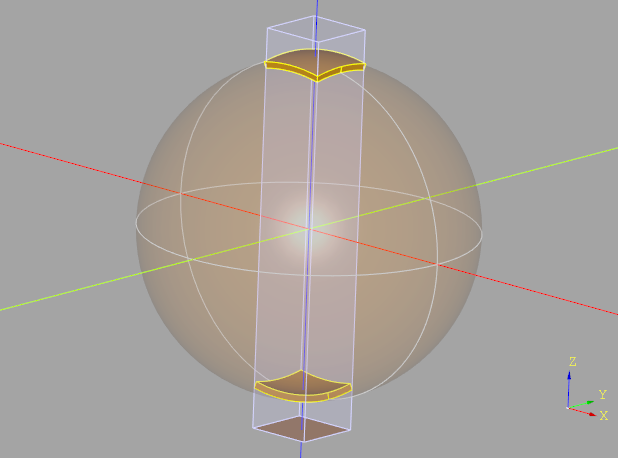
Non-planar faces are thickened both towards and away from the center of the sphere.
- パラメータ:
depth (float) -- Amount to thicken face(s), can be positive or negative.
normal_override (Vector, optional) -- Face only. The normal_override vector can be used to indicate which way is 'up', potentially flipping the face normal direction such that many faces with different normals all go in the same direction (direction need only be +/- 90 degrees from the face normal). Defaults to None.
- 例外:
RuntimeError -- Opencascade internal failures
- 戻り値:
The resulting Solid object
- 戻り値の型:
- touch(other: Shape, tolerance: float = 1e-06, found_solids: ShapeList | None = None) ShapeList[Vertex | Edge | Face][ソース]
Find where this Solid's boundary contacts another shape.
Returns geometry where boundaries contact without interior overlap: - Solid + Solid → Face + Edge + Vertex (all boundary contacts) - Solid + Face/Shell → Face + Edge + Vertex (boundary contacts) - Solid + Edge/Wire → Vertex (edge endpoints on solid boundary) - Solid + Vertex → Vertex if on boundary - Solid + Compound → distributes over compound elements
- パラメータ:
other -- Shape to check boundary contacts with
tolerance -- tolerance for contact detection
found_solids -- pre-found intersection solids to filter against
- 戻り値:
ShapeList of boundary contact geometry (empty if no contact)
- property volume: float
volume - the volume of this Solid
- class Wire(obj: TopoDS_Wire, label: str = '', color: Color | None = None, parent: Compound | None = None)[ソース]
- class Wire(edge: Edge, label: str = '', color: Color | None = None, parent: Compound | None = None)
- class Wire(wire: Wire, label: str = '', color: Color | None = None, parent: Compound | None = None)
- class Wire(wire: Curve, label: str = '', color: Color | None = None, parent: Compound | None = None)
- class Wire(edges: Iterable[Edge], sequenced: bool = False, label: str = '', color: Color | None = None, parent: Compound | None = None)
A Wire in build123d is a topological entity representing a connected sequence of edges forming a continuous curve or path in 3D space. Wires are essential components in modeling complex objects, defining boundaries for surfaces or solids. They store information about the connectivity and order of edges, allowing precise definition of paths within a 3D model.
- chamfer_2d(distance: float, distance2: float, vertices: Iterable[Vertex], edge: Edge | None = None) Wire[ソース]
Apply 2D chamfer to a wire
- classmethod combine(wires: Iterable[Wire | Edge], tol: float = 1e-09) ShapeList[Wire][ソース]
Combine a list of wires and edges into a list of Wires.
- classmethod extrude(obj: Shape, direction: Vector | tuple[float, float] | tuple[float, float, float] | Sequence[float]) Wire[ソース]
extrude - invalid operation for Wire
- fix_degenerate_edges(precision: float) Wire[ソース]
Fix a Wire that contains degenerate (very small) edges
- パラメータ:
precision (float) -- minimum value edge length
- 戻り値:
fixed wire
- 戻り値の型:
- geom_equal(other: Wire, tol: float = 1e-06, num_interpolation_points: int = 5) bool[ソース]
Compare two wires for geometric equality within tolerance.
This compares the geometric properties of two wires by comparing their constituent edges pairwise. Two independently created wires with the same geometry will return True.
- パラメータ:
other -- Wire to compare with
tol -- Tolerance for numeric comparisons. Defaults to 1e-6.
num_interpolation_points -- Number of points to sample for unknown curve types. Defaults to 5.
- 戻り値:
True if wires are geometrically equal within tolerance
- 戻り値の型:
bool
- classmethod make_circle(radius: float, plane: Plane = Plane((0, 0, 0), (1, 0, 0), (0, 0, 1))) Wire[ソース]
Makes a circle centered at the origin of plane
- classmethod make_convex_hull(edges: Iterable[Edge], tolerance: float = 0.001) Wire[ソース]
Create a wire of minimum length enclosing all of the provided edges.
Note that edges can't overlap each other.
- classmethod make_ellipse(x_radius: float, y_radius: float, plane: ~build123d.geometry.Plane = Plane((0, 0, 0), (1, 0, 0), (0, 0, 1)), start_angle: float = 360.0, end_angle: float = 360.0, angular_direction: ~build123d.build_enums.AngularDirection = <AngularDirection.COUNTER_CLOCKWISE>, closed: bool = True) Wire[ソース]
make ellipse
Makes an ellipse centered at the origin of plane.
- パラメータ:
x_radius (float) -- x radius of the ellipse (along the x-axis of plane)
y_radius (float) -- y radius of the ellipse (along the y-axis of plane)
plane (Plane, optional) -- base plane. Defaults to Plane.XY.
start_angle (float, optional) -- _description_. Defaults to 360.0.
end_angle (float, optional) -- _description_. Defaults to 360.0.
angular_direction (AngularDirection, optional) -- arc direction. Defaults to AngularDirection.COUNTER_CLOCKWISE.
closed (bool, optional) -- close the arc. Defaults to True.
- 戻り値:
an ellipse
- 戻り値の型:
- classmethod make_polygon(vertices: Iterable[Vector | tuple[float, float] | tuple[float, float, float] | Sequence[float]], close: bool = True) Wire[ソース]
Create an irregular polygon by defining vertices
- パラメータ:
vertices (Iterable[VectorLike])
close (bool, optional) -- close the polygon. Defaults to True.
- 戻り値:
an irregular polygon
- 戻り値の型:
- classmethod make_rect(width: float, height: float, plane: Plane = Plane((0, 0, 0), (1, 0, 0), (0, 0, 1))) Wire[ソース]
Make Rectangle
Make a Rectangle centered on center with the given normal
- order = 1.5
- static order_chamfer_edges(reference_edge: Edge | None, edges: tuple[Edge, Edge]) tuple[Edge, Edge][ソース]
Order the edges of a chamfer relative to a reference Edge
- order_edges() ShapeList[Edge][ソース]
Return the edges in self ordered by wire direction and orientation
- param_at(position: float) float[ソース]
Return the OCCT comp-curve parameter corresponding to the given wire position. This is not the edge composite parameter; it is the parameter of the wire’s BRepAdaptor_CompCurve.
- param_at_point(point: Vector | tuple[float, float] | tuple[float, float, float] | Sequence[float]) float[ソース]
Return the normalized wire parameter for the point closest to this wire.
This method projects the given point onto the wire, finds the nearest edge, and accumulates arc lengths to determine the fractional position along the entire wire. The result is normalized to the interval [0.0, 1.0], where:
0.0 corresponds to the start of the wire
1.0 corresponds to the end of the wire
Unlike the edge version of this method, the returned value is not an OCCT curve parameter, but a normalized parameter across the wire as a whole.
- パラメータ:
point (VectorLike) -- The point to project onto the wire.
- 例外:
ValueError -- Can't find point on empty wire
- 戻り値:
Normalized parameter in [0.0, 1.0] representing the relative position of the projected point along the wire.
- 戻り値の型:
float
- project_to_shape(target_object: Shape, direction: Vector | tuple[float, float] | tuple[float, float, float] | Sequence[float] | None = None, center: Vector | tuple[float, float] | tuple[float, float, float] | Sequence[float] | None = None) ShapeList[Wire][ソース]
Project Wire
Project a Wire onto a Shape generating new wires on the surfaces of the object one and only one of direction or center must be provided. Note that one or more wires may be generated depending on the topology of the target object and location/direction of projection.
To avoid flipping the normal of a face built with the projected wire the orientation of the output wires are forced to be the same as self.
- パラメータ:
target_object -- Object to project onto
direction -- Parallel projection direction. Defaults to None.
center -- Conical center of projection. Defaults to None.
target_object -- Shape:
direction -- VectorLike: (Default value = None)
center -- VectorLike: (Default value = None)
- 戻り値:
Projected wire(s)
- 例外:
ValueError -- Only one of direction or center must be provided
- trim(start: float | Vector | tuple[float, float] | tuple[float, float, float] | Sequence[float], end: float | Vector | tuple[float, float] | tuple[float, float, float] | Sequence[float]) Wire[ソース]
Trim a wire between [start, end] normalized over total length.
- パラメータ:
start (float | VectorLike) -- normalized start position (0.0 to <1.0) or point
end (float | VectorLike) -- normalized end position (>0.0 to 1.0) or point
- 戻り値:
trimmed Wire
- 戻り値の型:
- class Vertex[ソース]
- class Vertex(ocp_vx: TopoDS_Vertex)
- class Vertex(X: float, Y: float, Z: float)
- class Vertex(v: Iterable[float])
A Vertex in build123d represents a zero-dimensional point in the topological data structure. It marks the endpoints of edges within a 3D model, defining precise locations in space. Vertices play a crucial role in defining the geometry of objects and the connectivity between edges, facilitating accurate representation and manipulation of 3D shapes. They hold coordinate information and are essential for constructing complex structures like wires, faces, and solids.
- __add__(other: Vertex | Vector | tuple[float, float, float]) Vertex[ソース]
Add
Add to a Vertex with a Vertex, Vector or Tuple
- パラメータ:
other -- Value to add
- 例外:
TypeError -- other not in [Tuple,Vector,Vertex]
- 戻り値:
Result
サンプル
part.faces(">z").vertices("<y and <x").val() + (0, 0, 15)
which creates a new Vertex 15 above one extracted from a part. One can add or subtract a Vertex , Vector or tuple of float values to a Vertex.
- __sub__(other: Vertex | Vector | tuple) Vertex[ソース]
Subtract
Subtract a Vertex with a Vertex, Vector or Tuple from self
- パラメータ:
other -- Value to add
- 例外:
TypeError -- other not in [Tuple,Vector,Vertex]
- 戻り値:
Result
サンプル
part.faces(">z").vertices("<y and <x").val() - Vector(10, 0, 0)
- classmethod cast(obj: TopoDS_Shape) Self[ソース]
Returns the right type of wrapper, given a OCCT object
- classmethod extrude(obj: Shape, direction: Vector | tuple[float, float] | tuple[float, float, float] | Sequence[float]) Vertex[ソース]
extrude - invalid operation for Vertex
- order = 0.0
- transform_shape(t_matrix: Matrix) Vertex[ソース]
Apply affine transform without changing type
Transforms a copy of this Vertex by the provided 3D affine transformation matrix. Note that not all transformation are supported - primarily designed for translation and rotation. See :transform_geometry: for more comprehensive transformations.
- property volume: float
volume - the volume of this Vertex, which is always zero
- class Curve(obj: TopoDS_Compound | Iterable[Shape] | None = None, label: str = '', color: Color | None = None, material: str = '', joints: dict[str, Joint] | None = None, parent: Compound | None = None, children: Sequence[Shape] | None = None)[ソース]
A Compound containing 1D objects - aka Edges
Import/Export
Methods and functions specific to exporting and importing build123d objects are defined below.
- import_brep(file_name: PathLike | str | bytes) Shape[ソース]
Import shape from a BREP file
- パラメータ:
file_name (Union[PathLike, str, bytes]) -- brep file
- 例外:
ValueError -- file not found
- 戻り値:
build123d object
- 戻り値の型:
- import_step(filename: PathLike | str | bytes) Compound[ソース]
Extract shapes from a STEP file and return them as a Compound object.
- パラメータ:
file_name (Union[PathLike, str, bytes]) -- file path of STEP file to import
- 例外:
ValueError -- can't open file
- 戻り値:
contents of STEP file
- 戻り値の型:
- import_stl(file_name: ~os.PathLike | str | bytes, model_unit: ~build123d.build_enums.Unit = <Unit.MM>) Face[ソース]
Extract shape from an STL file and return it as a Face reference object.
Note that importing with this method and creating a reference is very fast while creating an editable model (with Mesher) may take minutes depending on the size of the STL file.
- パラメータ:
file_name (Union[PathLike, str, bytes]) -- file path of STL file to import
model_unit (Unit, optional) -- the default unit used when creating the model. For example, Blender defaults to Unit.M. Defaults to Unit.MM.
- 例外:
ValueError -- Could not import file
ValueError -- Invalid model_unit
- 戻り値:
STL model
- 戻り値の型:
- import_svg(svg_file: str | Path | TextIO, *, flip_y: bool = True, align: Align | tuple[Align, Align] | None = Align.MIN, ignore_visibility: bool = False, label_by: Literal['id', 'class', 'inkscape:label'] | str = 'id') ShapeList[Wire | Face][ソース]
- import_svg(svg_file: str | Path | TextIO, *, flip_y: bool = True, align: Align | tuple[Align, Align] | None = Align.MIN, ignore_visibility: bool = False, label_by: Literal['id', 'class', 'inkscape:label'] | str = 'id', is_inkscape_label: bool | None = None) ShapeList[Wire | Face]
import_svg
- パラメータ:
svg_file (Union[str, Path, TextIO]) -- svg file
flip_y (bool, optional) -- flip objects to compensate for svg orientation. Defaults to True.
align (Align | tuple[Align, Align] | None, optional) -- alignment of the SVG's viewbox, if None, the viewbox's origin will be at (0,0,0). Defaults to Align.MIN.
ignore_visibility (bool, optional) -- Defaults to False.
label_by (str, optional) -- XML attribute to use for imported shapes' label property. Defaults to "id". Use inkscape:label to read labels set from Inkscape's "Layers and Objects" panel.
- 例外:
ValueError -- unexpected shape type
- 戻り値:
objects contained in svg
- 戻り値の型:
- import_svg_as_buildline_code(file_name: PathLike | str | bytes, precision: int = 6) tuple[str, str][ソース]
translate_to_buildline_code
Translate the contents of the given svg file into executable build123d/BuildLine code.
- パラメータ:
file_name (PathLike | str | bytes]) -- svg file name
precision (int) -- # digits to round values to. Defaults to # digits in TOLERANCE
- 戻り値:
code, builder instance name
- 戻り値の型:
tuple[str, str]
Joint Object
Base Joint class which is used to position Solid and Compound objects relative to each other are defined below. The Joints section contains the class description of the derived Joint classes.