Sort Examples
SortBy
SortBy enums are shape property shorthands which work across
Shape multiple object types. SortBy is a criteria for both sort_by and
group_by.
SortBy.LENGTHworks withEdge,WireSortBy.AREAworks withFace,SolidSortBy.VOLUMEworks withSolidSortBy.RADIUSworks withEdge,FacewithGeomTypeCIRCLE,CYLINDER,SPHERESortBy.DISTANCEworksVertex,Edge,Wire,Face,Solid
SortBy is often interchangeable with specific shape properties and can alternatively
be used with``group_by``.
Setup
from build123d import *

with BuildPart() as part:
    Box(5, 5, 1)
    Cylinder(2, 5)
    edges = part.edges().filter_by(lambda a: a.length == 1)
    fillet(edges, 1)
part.wires().sort_by(SortBy.LENGTH)[:4]

part.wires().sort_by(Wire.length)[:4]
part.wires().group_by(SortBy.LENGTH)[0]

part.vertices().sort_by(SortBy.DISTANCE)[-2:]

part.vertices().sort_by_distance(Vertex())[-2:]
part.vertices().group_by(Vertex().distance)[-1]

Along Wire
Vertices selected from an edge or wire might have a useful ordering when created from a single object, but when created from multiple objects, the ordering not useful. For example, when applying incrementing fillet radii to a list of vertices from the face, the order is random.
Setup
from build123d import *

with BuildSketch() as along_wire:
    Rectangle(48, 16, align=Align.MIN)
    Rectangle(16, 48, align=Align.MIN)
    Rectangle(32, 32, align=Align.MIN)
    for i, v in enumerate(along_wire.vertices()):
        fillet(v, i + 1)

Vertices may be sorted along the wire they fall on to create order. Notice the fillet radii now increase in order.
    sorted_verts = along_wire.vertices().sort_by(along_wire.wire())
    for i, v in enumerate(sorted_verts):
        fillet(v, i + 1)

Axis
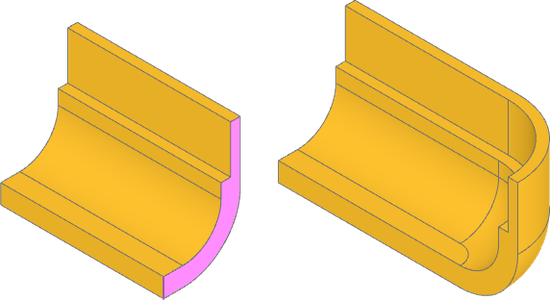
Sorting by axis is often the most straightforward way to optimize selections. In this part we want to revolve the face at the end around an inside edge of the completed extrusion. First, the face to extrude can be found by sorting along x-axis and the revolution edge can be found sorting along y-axis.
Setup
from build123d import *

with BuildPart() as part:
    with BuildSketch(Plane.YZ) as profile:
        with BuildLine():
            l1 = FilletPolyline((16, 0), (32, 0), (32, 25), radius=12)
            l2 = FilletPolyline((16, 4), (28, 4), (28, 15), radius=8)
            Line(l1 @ 0, l2 @ 0)
            Polyline(l1 @ 1, l1 @ 1 - Vector(2, 0), l2 @ 1 + Vector(2, 0), l2 @ 1)
        make_face()
    extrude(amount=34)
    face = part.faces().sort_by(Axis.X)[-1]
    edge = face.edges().sort_by(Axis.Y)[0]
    revolve(face, -Axis(edge), 90)
Distance From
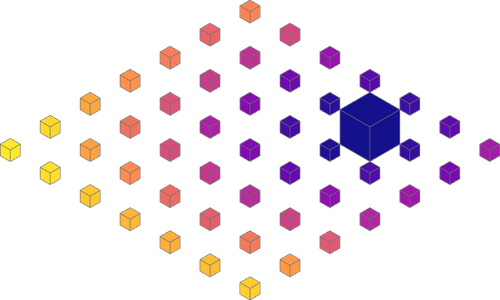
A sort_by_distance can be used to sort objects by their distance from another object.
Here we are sorting the boxes by distance from the origin, using an empty Vertex
(at the origin) as the reference shape to find distance to.
Setup
from itertools import product

from build123d import *
from ocp_vscode import *

boxes = ShapeList(
    Box(1, 1, 1).scale(0.75 if (i, j) == (1, 2) else 0.25).translate((i, j, 0))
    for i, j in product(range(-3, 4), repeat=2)
)
boxes = boxes.sort_by_distance(Vertex())
show(*boxes, colors=ColorMap.listed(len(boxes)))
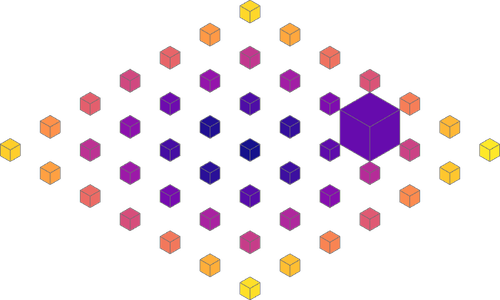
The example can be extended by first sorting the boxes by volume using the Solid
property volume, and getting the last (largest) box. Then, the boxes sorted by
their distance from the largest box.
boxes = boxes.sort_by_distance(boxes.sort_by(Solid.volume).last)
show(*boxes, colors=ColorMap.listed(len(boxes)))