Filter Examples
GeomType
GeomType enums are shape type shorthands for Edge and Face
objects. They are most helpful for filtering objects of that specific type for further
operations, and are sometimes necessary e.g. before sorting or filtering by radius.
Edge and Face each support a subset of GeomType:
Edgecan be typeLINE,CIRCLE,ELLIPSE,HYPERBOLA,PARABOLA,BEZIER,BSPLINE,OFFSET,OTHERFacecan be typePLANE,CYLINDER,CONE,SPHERE,TORUS,BEZIER,BSPLINE,REVOLUTION,EXTRUSION,OFFSET,OTHER
Setup
from build123d import *

with BuildPart() as part:
    Box(5, 5, 1)
    Cylinder(2, 5)
    edges = part.edges().filter_by(lambda a: a.length == 1)
    fillet(edges, 1)
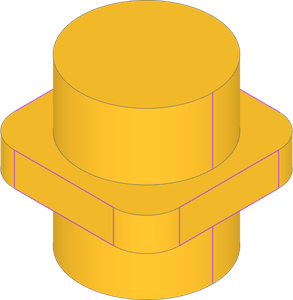
part.edges().filter_by(GeomType.LINE)
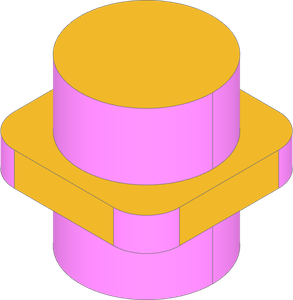
part.faces().filter_by(GeomType.CYLINDER)
All Edges Circle
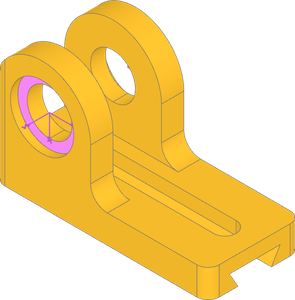
In this complete bearing block, we want to add joints for the bearings. These should be located in the counterbore recess. One way to locate the joints is by finding faces with centers located where the joints need to be located. Filtering for faces with only circular edges selects the counterbore faces that meet the joint criteria.
Setup
from build123d import *

with BuildPart() as part:
    with BuildSketch() as s:
        Rectangle(115, 50)
        with Locations((5 / 2, 0)):
            SlotOverall(90, 12, mode=Mode.SUBTRACT)
    extrude(amount=15)

    with BuildSketch(Plane.XZ.offset(50 / 2)) as s3:
        with Locations((-115 / 2 + 26, 15)):
            SlotOverall(42 + 2 * 26 + 12, 2 * 26, rotation=90)
    zz = extrude(amount=-12)
    split(bisect_by=Plane.XY)
    edgs = part.part.edges().filter_by(Axis.Y).group_by(Axis.X)[-2]
    fillet(edgs, 9)

    with Locations(zz.faces().sort_by(Axis.Y)[0]):
        with Locations((42 / 2 + 6, 0)):
            CounterBoreHole(24 / 2, 34 / 2, 4)
    mirror(about=Plane.XZ)

    with BuildSketch() as s4:
        RectangleRounded(115, 50, 6)
    extrude(amount=80, mode=Mode.INTERSECT)
    # fillet does not work right, mode intersect is safer

    with BuildSketch(Plane.YZ) as s4:
        with BuildLine() as bl:
            l1 = Line((0, 0), (18 / 2, 0))
            l2 = PolarLine(l1 @ 1, 8, 60, length_mode=LengthMode.VERTICAL)
            l3 = Line(l2 @ 1, (0, 8))
            mirror(about=Plane.YZ)
        make_face()
    extrude(amount=115 / 2, both=True, mode=Mode.SUBTRACT)
    faces = part.faces().filter_by(
        lambda f: all(e.geom_type == GeomType.CIRCLE for e in f.edges())
    )
    for i, f in enumerate(faces):
        RigidJoint(f"bearing_bore_{i}", joint_location=f.center_location)
Axis and Plane
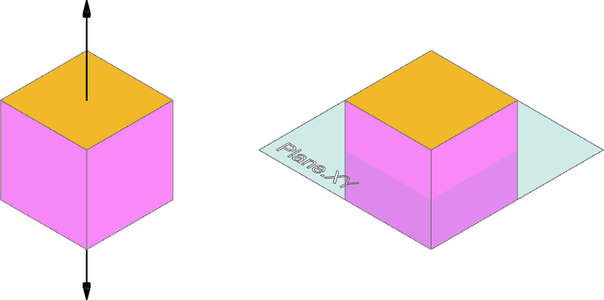
Filtering by an Axis will select faces perpendicular to the axis. Likewise filtering by Plane will select faces parallel to the plane.
Setup
from build123d import *

with BuildPart() as part:
    Box(1, 1, 1)
part.faces().filter_by(Axis.Z)
part.faces().filter_by(Plane.XY)
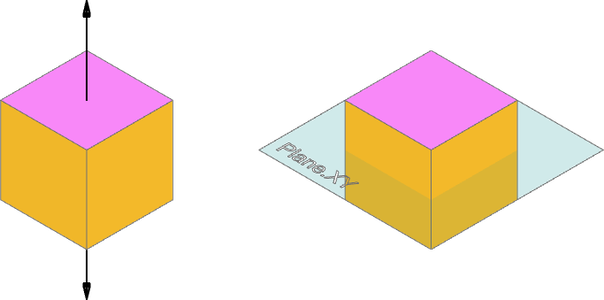
It might be useful to filter by an Axis or Plane in other ways. A lambda can be used to accomplish this with feature properties or methods. Here, we are looking for faces where the dot product of face normal and either the axis direction or the plane normal is about to 0. The result is faces parallel to the axis or perpendicular to the plane.
part.faces().filter_by(lambda f: abs(f.normal_at().dot(Axis.Z.direction) < 1e-6)
part.faces().filter_by(lambda f: abs(f.normal_at().dot(Plane.XY.z_dir)) < 1e-6)
Inner Wire Count
This motor bracket imported from a step file needs joints for adding to an assembly. Joints for the M3 clearance holes were already found by using the cylindrical face's axis of rotation, but the motor bore and slots need specific placement. The motor bore can be found by filtering for faces with 5 inner wires, sorting for the desired face, and then filtering for the specific inner wire by radius.
bracket STEP model:
nema-17-bracket.step
Setup
from build123d import *

bracket = import_step(os.path.join(working_path, "nema-17-bracket.step"))
faces = bracket.faces()

motor_mounts = faces.filter_by(GeomType.CYLINDER).filter_by(lambda f: f.radius == 3.3/2)
for i, f in enumerate(motor_mounts):
    location = f.axis_of_rotation.location
    RigidJoint(f"motor_m3_{i}", bracket, joint_location=location)
motor_face = faces.filter_by(lambda f: len(f.inner_wires()) == 5).sort_by(Axis.X)[-1]
motor_bore = motor_face.inner_wires().edges().filter_by(lambda e: e.radius == 16).edge()
location = Location(motor_bore.arc_center, motor_bore.normal() * 90, Intrinsic.YXZ)
RigidJoint(f"motor", bracket, joint_location=location)
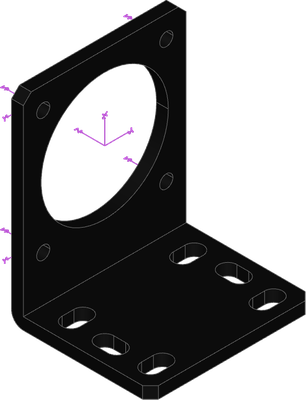
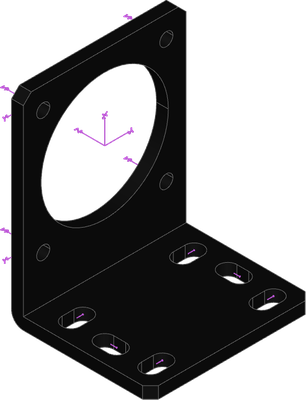
Linear joints for the slots are appropriate for mating flexibility, but require more than a single location. The slot arc centers can be used for creating a linear joint axis and range. To do that we can filter for faces with 6 inner wires, sort for and select the top face, and then filter for the circular edges of the inner wires.
mount_face = faces.filter_by(lambda f: len(f.inner_wires()) == 6).sort_by(Axis.Z)[-1]
mount_slots = mount_face.inner_wires().edges().filter_by(GeomType.CIRCLE)
joint_edges = [
    Line(mount_slots[i].arc_center, mount_slots[i + 1].arc_center)
    for i in range(0, len(mount_slots), 2)
]
for i, e in enumerate(joint_edges):
    LinearJoint(f"mount_m4_{i}", bracket, axis=Axis(e), linear_range=(0, e.length / 2))
Nested Filters
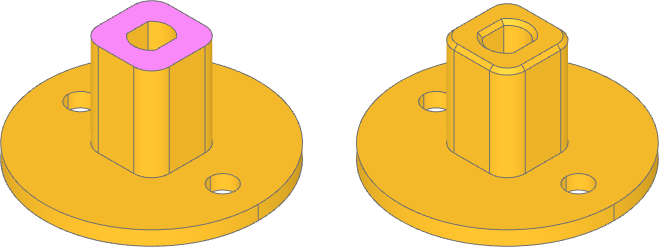
Filters can be nested to specify features by characteristics other than their own, like child properties. Here we want to chamfer the mating edges of the D bore and square shaft. A way to do this is first looking for faces with only 2 line edges among the inner wires. The nested filter captures the straight edges, while the parent filter selects faces based on the count. Then, from those faces, we filter for the wires with any line edges.
Setup
from build123d import *

with BuildPart() as part:
    Cylinder(15, 2, align=(Align.CENTER, Align.CENTER, Align.MIN))
    with BuildSketch():
        RectangleRounded(10, 10, 2.5)
    extrude(amount=15)

    with BuildSketch():
        Circle(2.5)
        Rectangle(4, 5, mode=Mode.INTERSECT)
    extrude(amount=15, mode=Mode.SUBTRACT)

    with GridLocations(20, 0, 2, 1):
        Hole(3.5 / 2)
    faces = part.faces().filter_by(
        lambda f: len(f.inner_wires().edges().filter_by(GeomType.LINE)) == 2
    )
    wires = faces.wires().filter_by(
        lambda w: any(e.geom_type == GeomType.LINE for e in w.edges())
    )
    chamfer(wires.edges(), 0.5)
Shape Properties
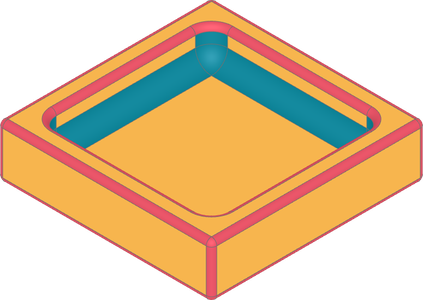
Selected features can be quickly filtered by feature properties. First, we filter by
interior and exterior edges using the Edge is interior property to apply
different fillets accordingly. Then the Face is_circular_* properties are used
to highlight the resulting fillets.
from build123d import *
from ocp_vscode import *

with BuildPart() as open_box_builder:
    Box(20, 20, 5)
    offset(amount=-2, openings=open_box_builder.faces().sort_by(Axis.Z)[-1])
    inside_edges = open_box_builder.edges().filter_by(Edge.is_interior)
    fillet(inside_edges, 1.5)
    outside_edges = open_box_builder.edges().filter_by(Edge.is_interior, reverse=True)
    fillet(outside_edges, 0.5)

open_box = open_box_builder.part
open_box.color = Color(0xEDAE49)
outside_fillets = Compound(open_box.faces().filter_by(Face.is_circular_convex))
outside_fillets.color = Color(0xD1495B)
inside_fillets = Compound(open_box.faces().filter_by(Face.is_circular_concave))
inside_fillets.color = Color(0x00798C)