Location arithmetic for algebra mode
Position a shape relative to the XY plane
For the following use the helper function:
def location_symbol(location: Location, scale: float = 1) -> Compound:
    return Compound.make_triad(axes_scale=scale).locate(location)

def plane_symbol(plane: Plane, scale: float = 1) -> Compound:
    triad = Compound.make_triad(axes_scale=scale)
    circle = Circle(scale * .8).edge()
    return (triad + circle).locate(plane.location)
Positioning at a location
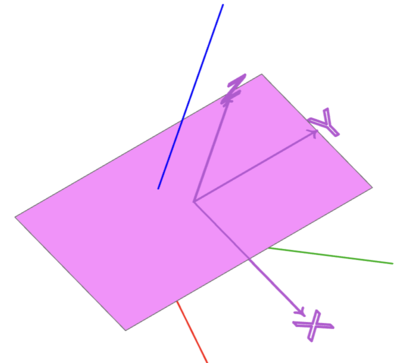
loc = Location((0.1, 0.2, 0.3), (10, 20, 30))

face = loc * Rectangle(1, 2)

show_object(face, name="face")
show_object(location_symbol(loc), name="location")
Positioning on a plane
plane = Plane.XZ

face = plane * Rectangle(1, 2)

show_object(face, name="face")
show_object(plane_symbol(plane), name="plane")
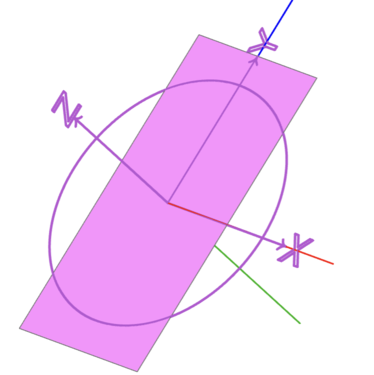
Note: The x-axis and the y-axis of the plane are on the x-axis and the z-axis of the world coordinate system (red and blue axis).
Relative positioning to a plane
Position an object on a plane relative to the plane
loc = Location((0.1, 0.2, 0.3), (10, 20, 30))

face = loc * Rectangle(1,2)

box = Plane(loc) * Pos(0.2, 0.4, 0.1) * Box(0.2, 0.2, 0.2)
# box = Plane(face.location) * Pos(0.2, 0.4, 0.1) * Box(0.2, 0.2, 0.2)
# box = loc * Pos(0.2, 0.4, 0.1) * Box(0.2, 0.2, 0.2)

show_object(face, name="face")
show_object(location_symbol(loc), name="location")
show_object(box, name="box")
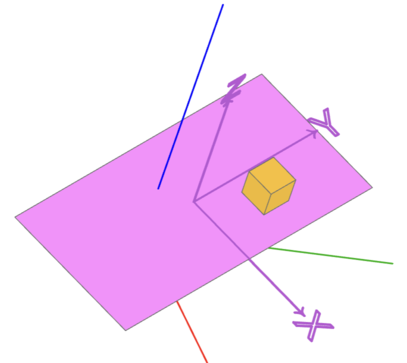
The X, Y, Z components of Pos(0.2, 0.4, 0.1) are relative to the x-axis, y-axis or
z-axis of the underlying location loc.
Note: Plane(loc) *, Plane(face.location) * and loc * are equivalent in this example.
Rotate an object on a plane relative to the plane
loc = Location((0.1, 0.2, 0.3), (10, 20, 30))

face = loc * Rectangle(1,2)

box = Plane(loc) * Rot(Z=80) * Box(0.2, 0.2, 0.2)

show_object(face, name="face")
show_object(location_symbol(loc), name="location")
show_object(box, name="box")
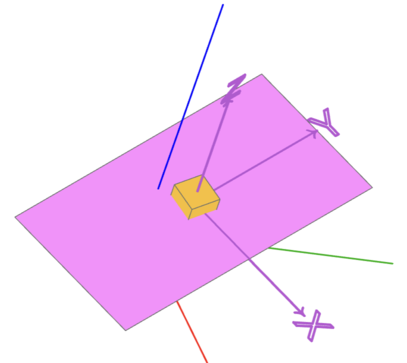
The box is rotated via Rot(Z=80) around the z-axis of the underlying location
(and not of the z-axis of the world).
More general:
loc = Location((0.1, 0.2, 0.3), (10, 20, 30))

face = loc * Rectangle(1,2)

box = loc * Rot(20, 40, 80) * Box(0.2, 0.2, 0.2)

show_object(face, name="face")
show_object(location_symbol(loc), name="location")
show_object(box, name="box")
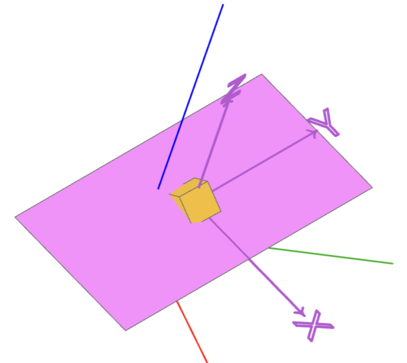
The box is rotated via Rot(20, 40, 80) around all three axes relative to the plane.
Rotate and position an object relative to a location
loc = Location((0.1, 0.2, 0.3), (10, 20, 30))

face = loc * Rectangle(1,2)

box = loc * Rot(20, 40, 80) * Pos(0.2, 0.4, 0.1) * Box(0.2, 0.2, 0.2)

show_object(face, name="face")
show_object(location_symbol(loc), name="location")
show_object(box, name="box")
show_object(location_symbol(loc * Rot(20, 40, 80), 0.5), options={"color":(0, 255, 255)}, name="local_location")
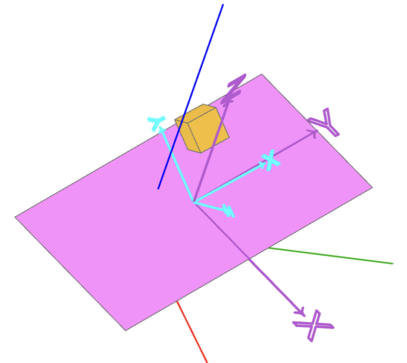
The box is positioned via Pos(0.2, 0.4, 0.1) relative to the location loc * Rot(20, 40, 80)
Position and rotate an object relative to a location
loc = Location((0.1, 0.2, 0.3), (10, 20, 30))

face = loc * Rectangle(1,2)

box = loc * Pos(0.2, 0.4, 0.1) * Rot(20, 40, 80) * Box(0.2, 0.2, 0.2)

show_object(face, name="face")
show_object(location_symbol(loc), name="location")
show_object(box, name="box")
show_object(location_symbol(loc * Pos(0.2, 0.4, 0.1), 0.5), options={"color":(0, 255, 255)}, name="local_location")
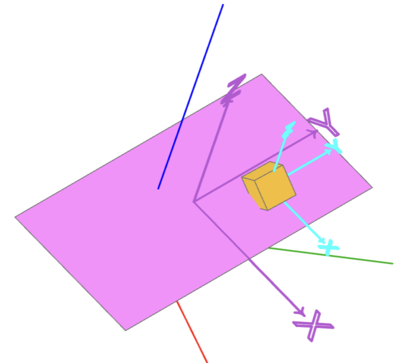
Note: This is the same as box = loc * Location((0.2, 0.4, 0.1), (20, 40, 80)) * Box(0.2, 0.2, 0.2)